Convert QBO to PDF
To convert QBO to PDF, upload the Web Connect file your bank gave you and press Convert. Statesift reads every transaction in it and builds a printable report with the date, description, money out and money in for each row. The same run also gives you Excel, CSV and JSON copies of the data.
By The Statesift team (Product and testing). Last updated .
QBO, QFX, OFX up to 15 MB. Read in memory, never stored.
How to convert QBO to PDF, step by step
- Find the .qbo file you downloaded from your bank. It usually sits in your Downloads folder.
- Drop the file into the converter above. QFX and OFX files work in the same box.
- Press Convert and look at the preview: it lists the rows, the period and the totals.
- Download the PDF report to print or archive it, or pick the Excel file if you want to sort the rows.
Your first statement is free with a free account, up to 5 pages. After that, see the pricing page for prices and plans, or read how we test the tool.
QBO to PDF tested with a real statement
We ran one of our own test bank files through the same code the tool on this page uses. So the pictures and the numbers below come from that run, not from a mockup.
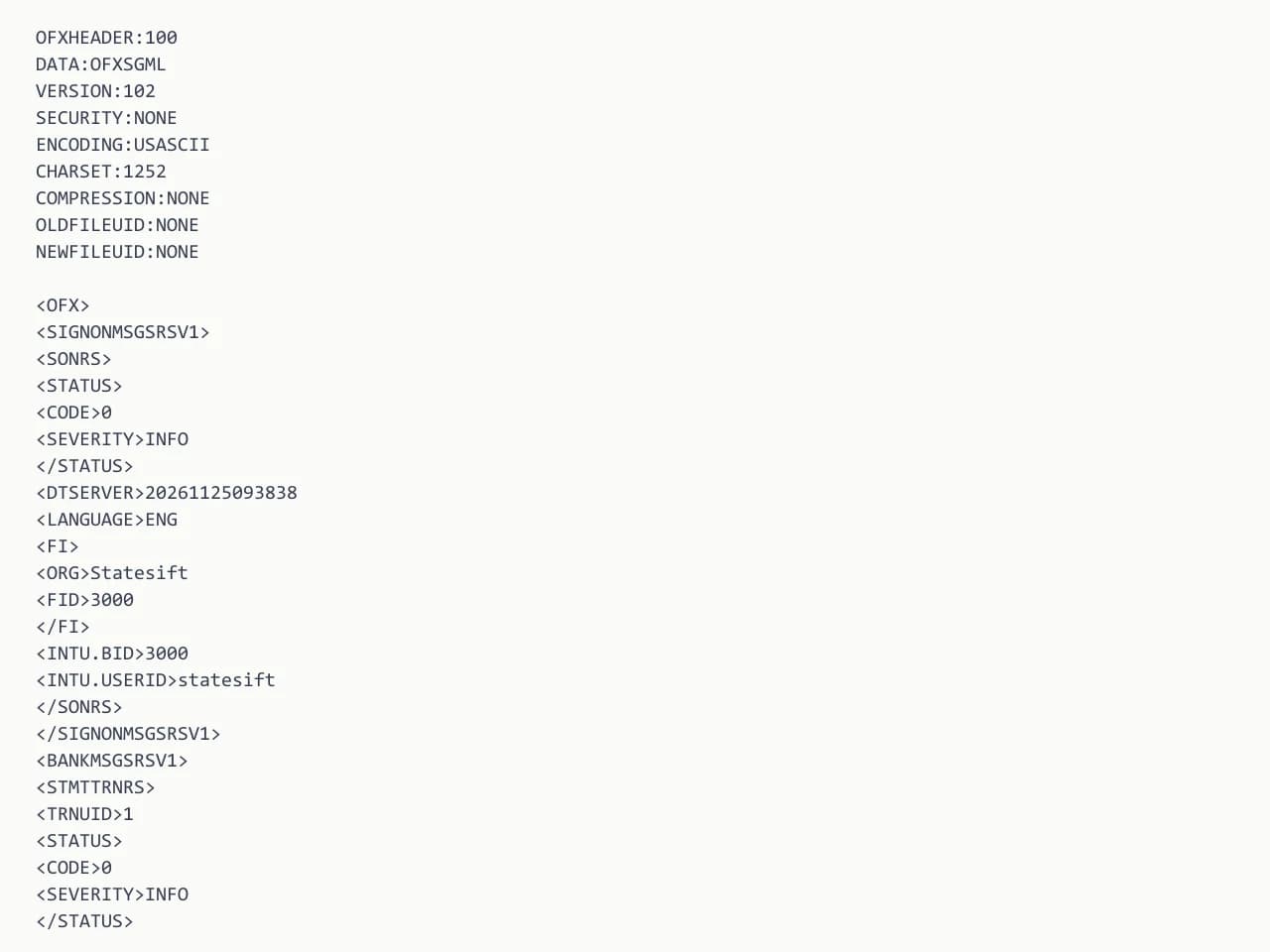
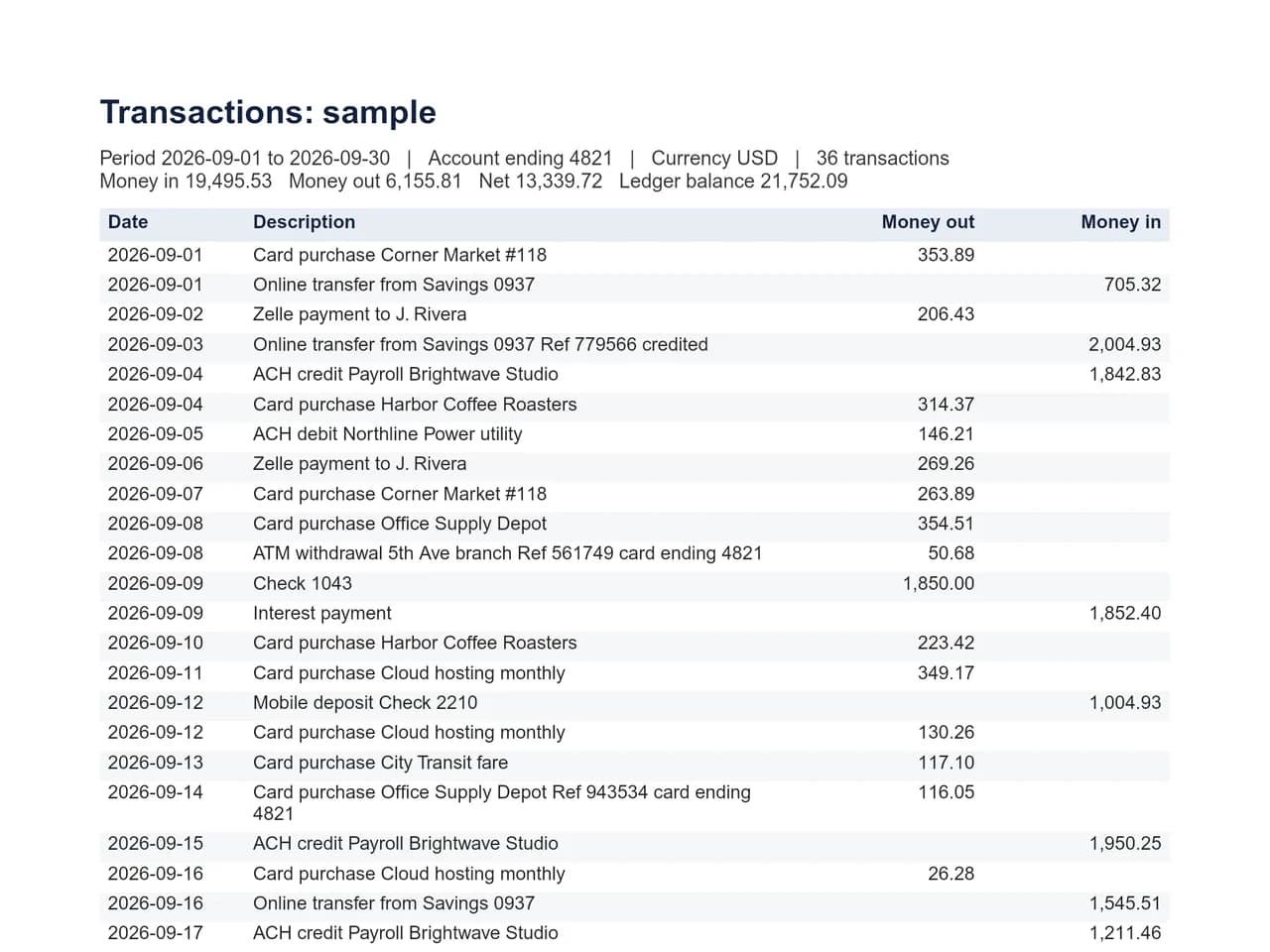
- Test input
- sample.qbo
- Output
- sample.pdf
- Rows
- 36
- Money in
- 19495.53
- Money out
- 6155.81
- Currency
- USD
- Output size
- 3 KB
- Engine time
- 175 ms
How we test: each test statement prints an opening and a closing balance, and the run only counts when the rows add up to both. More on the about page.
What is inside a QBO file
A QBO file is a QuickBooks Web Connect download. Inside, it holds plain text in the OFX format, plus a bank ID that QuickBooks uses to match the file to your bank. Each transaction sits in its own block with a posted date, an amount, a payee name and often a memo. Near the end, most banks also add the ledger balance on the day they made the file.
So the data is all there, but it is not meant for people to read. If you open the file in Notepad, you see rows of tags such as DTPOSTED and TRNAMT, with dates written as 20261031. That is fine for software. However, it does not help when you need to check a payment, send a copy to someone or keep a clean record.
How to open a QBO file as a PDF without QuickBooks
Intuit built Web Connect for QuickBooks Desktop, and its own help page says .qbo is the only type Web Connect can read. As a result, people often end up with a QBO file and no copy of QuickBooks, or with a file from an old company they closed. In both cases, a QBO to PDF report is the quickest way to see what the bank sent.
Here, you skip the install and the company file. First, upload the .qbo file. Then the converter pulls out each transaction, sorts the rows from oldest to newest and turns dates into the plain YYYY-MM-DD form. Finally, it writes a Letter size PDF that prints cleanly on one or more pages, with the column header repeated on each page.
What the QBO to PDF report shows
The top of the report gives you the period, the last four digits of the account, the currency and the number of transactions. Below that, one line sums up money in, money out and the net change. When the file includes a ledger balance, that figure appears too, so you can compare it with your own records.
After the header comes the table, with four columns: Date, Description, Money out and Money in. Because each amount lands in the right column, you never have to read minus signs. For a credit card file, purchases show as money out and payments show as money in. In addition, long payee names wrap inside their cell instead of running off the page.
When a QBO to PDF report is not the right tool
If you simply want the transactions in QuickBooks, import the QBO file there and skip this step. Likewise, if a lender or a landlord asks for a bank statement, send the official PDF from your online banking. Our report shows what the file contains, but your bank did not issue it, so it does not replace a real statement.
Also keep in mind that a QBO file has no running balance on each row. For that reason, we cannot run the row by row balance check that our PDF statement converter does. We show the ledger balance from the file and work the opening balance back from it. If you need every row checked against printed balances, convert the bank's PDF statement instead.
QBO to PDF at a glance
| Item | Detail |
|---|---|
| Input | QBO, QFX or OFX file (SGML 1.x or XML 2.x) |
| Main output | Printable PDF report, Letter size |
| Report columns | Date, Description, Money out, Money in |
| Report header | Period, account ending, currency, totals, ledger balance |
| Also included | Excel, CSV, OFX, QFX, QBO and JSON |
| Storage | None: read in memory, then discarded |
QBO to PDF FAQ
How do I open a QBO file without QuickBooks?
Upload it here and press Convert. You get a PDF report you can read and print, plus an Excel file and a CSV. You do not need QuickBooks, an Intuit account or a company file to see the transactions.
Can I print a QBO file?
Not in a useful way. Printing the raw file gives you pages of tags and codes. Convert QBO to PDF first, then print the report, which lists one transaction per line with clear money in and money out columns.
Is a QBO file the same as an OFX file?
Almost. A QBO file uses the OFX format and adds an Intuit bank ID, so QuickBooks knows which bank sent it. That is why this converter reads QBO, QFX and OFX files with the same engine.
Does the PDF report count as a bank statement?
No. It shows the data in the file in a form you can read, but your bank did not issue it. For a loan or a rental application, download the official statement from your online banking.
Is it safe to upload a QBO file?
We read the file in memory, build the report and discard the file once the download is ready. Nothing goes to disk, and we never ask for your bank login.