Import a bank statement to QuickBooks
To move a bank statement to QuickBooks, convert the PDF here and pick the file your version needs. QuickBooks Desktop imports the .qbo Web Connect file. QuickBooks Online takes that same .qbo file or a CSV through Upload from file. Either way, every row is checked against the printed balance first.
By The Statesift team (Product and testing). Last updated .
PDF up to 15 MB. Read in memory, never stored.
How to import a bank statement to QuickBooks, step by step
- Download the statement PDF from your online banking and drop it into the box above.
- Press Convert and wait for the stamp. Balanced means the rows match the closing balance.
- For QuickBooks Desktop, download the .qbo file. For QuickBooks Online, take the .qbo file or the CSV.
- Import the file into the matching account, then review and match the new rows in QuickBooks.
Your first statement is free with a free account, up to 5 pages. After that, see the pricing page for prices and plans, or read how we test the tool.
Bank statement to QuickBooks tested with a real statement
We ran one of our own test statements through the same code the tool on this page uses. So the pictures and the numbers below come from that run, not from a mockup.
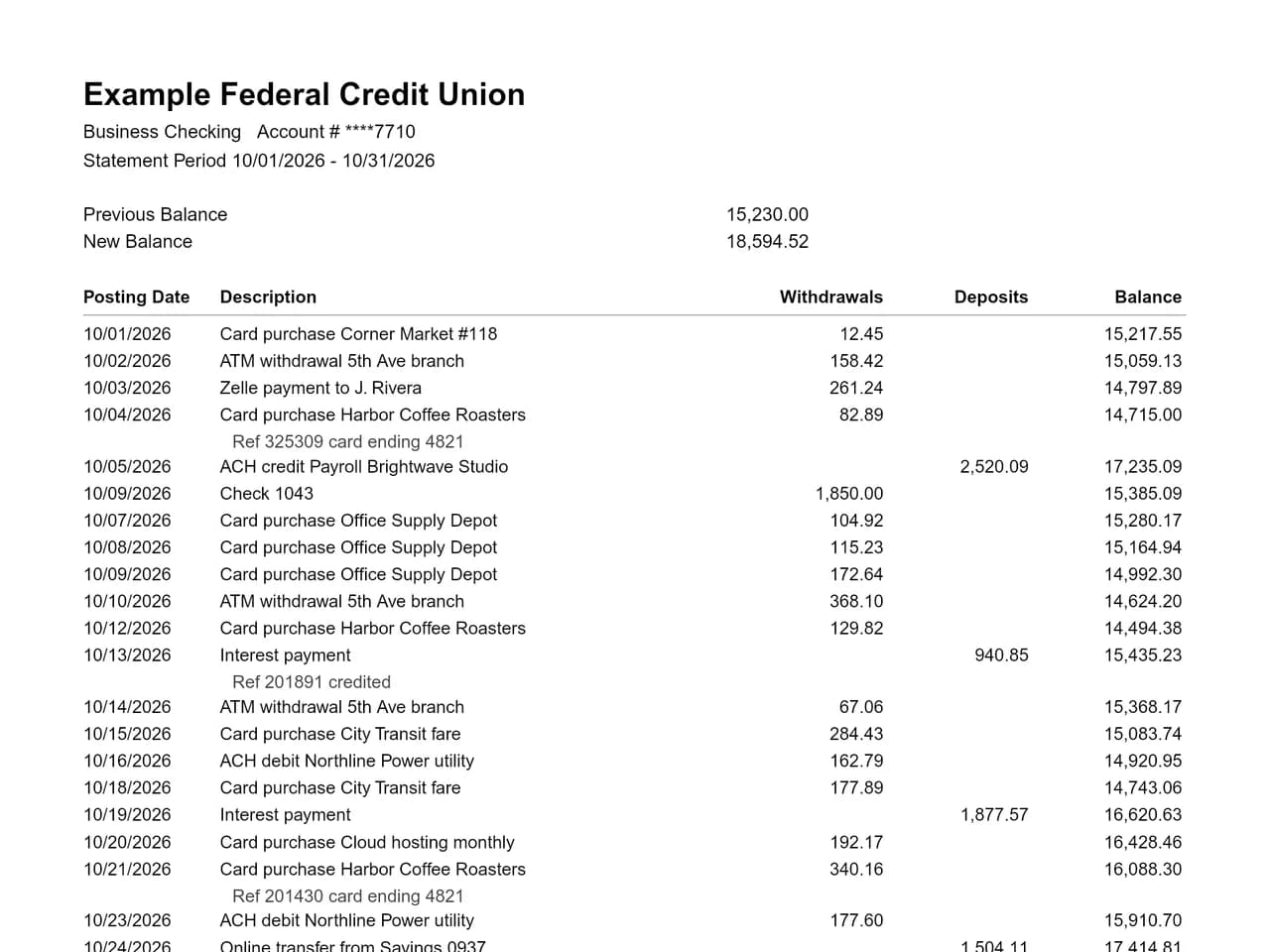
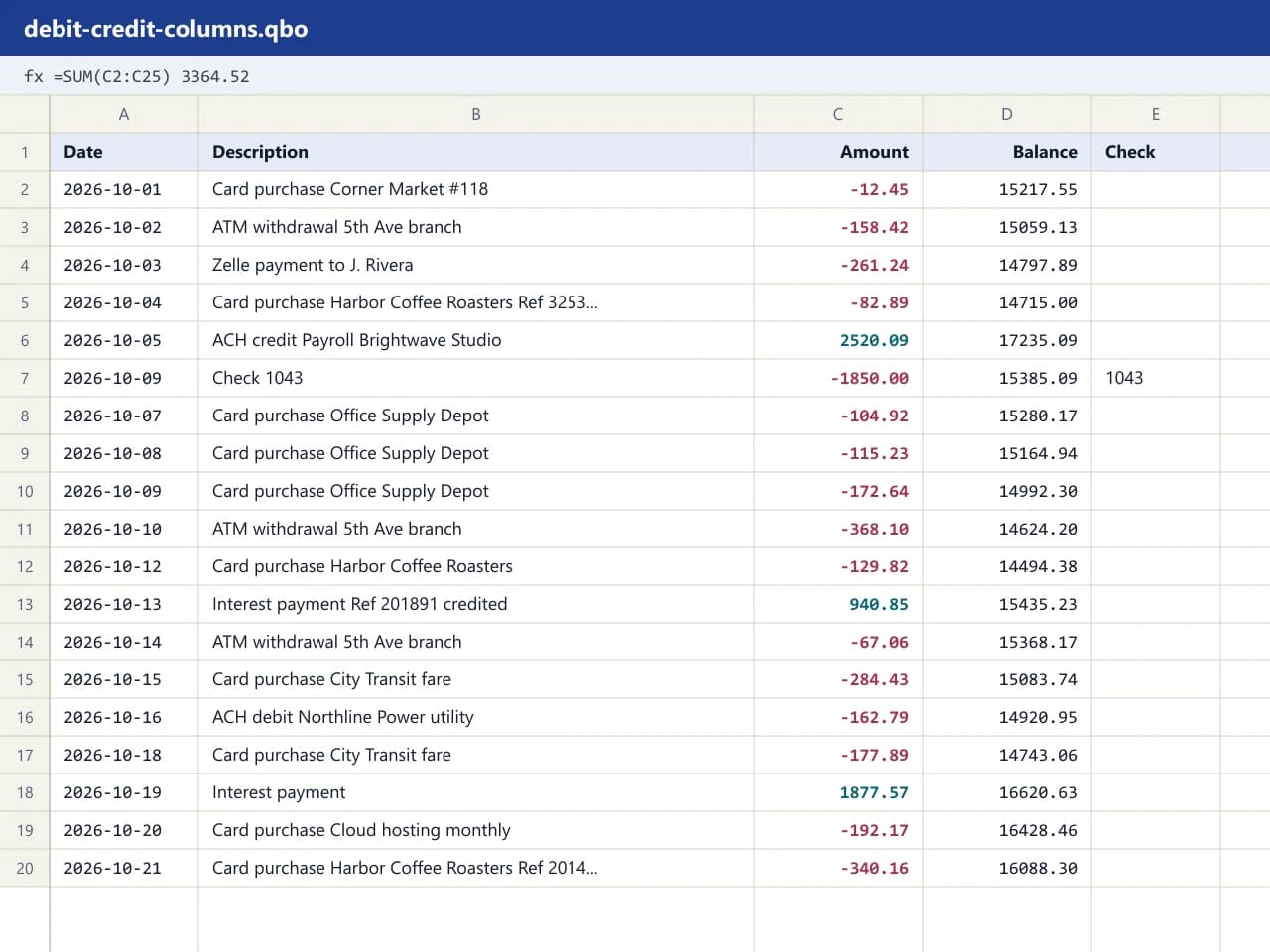 Balanced
- Test input
- debit-credit-columns.pdf
- Output
- debit-credit-columns.qbo
- Rows
- 24
- Money in
- 8243.43
- Money out
- 4878.91
- Pages
- 1
- Currency
- USD
- Output size
- 5 KB
- Engine time
- 28 ms
How we test: each test statement prints an opening and a closing balance, and the run only counts when the rows add up to both. More on the about page.
QuickBooks Online or Desktop: which file to use
The two versions of QuickBooks read bank files in different ways. QuickBooks Desktop uses Web Connect, and Intuit says .qbo is the only file type Web Connect can read. So for Desktop the choice is simple: download the QBO file from your run and import that.
QuickBooks Online is more flexible. Its Upload from file option takes .csv, .txt, .qbo and .ofx files, with up to 1,000 lines per upload. Intuit suggests QBO when you have it, because the file already names each field. However, a CSV is handy when you want to fix a payee name or drop a row before the import.
Upload a bank statement to QuickBooks Online
In QuickBooks Online, open Bank transactions and select the account tile. Next, open the Link account menu and choose Upload from file. If the account has no bank connection, the button reads Upload transactions instead. Then pick your file, choose the account and confirm which rows to add.
With a CSV, QuickBooks asks you to map the columns. Intuit wants either three columns (Date, Description, Amount) or four (Date, Description, Credit, Debit). Our CSV also holds Balance and Check number, so delete the extra columns first to stay inside that rule. Also note Intuit's other limits: the file must be 350 KB or smaller and use one date format throughout.
Import a bank statement to QuickBooks Desktop
First, back up your company file, as Intuit advises. Then sign in to your Intuit Account inside QuickBooks Desktop, since Intuit says .qbo imports need that sign in. After that, open the .qbo file from QuickBooks and link it to the right bank or card account.
If the import fails, Intuit suggests switching Bank Feeds to Classic mode, also called Register mode, and trying again. A message that QuickBooks cannot verify the financial institution usually points to the bank ID. In that case, convert again and type your own bank's ID in the Bank ID field, instead of the default 3000. Even so, Intuit's help assumes a file from your bank's website, so Desktop may still refuse a converted file.
When this is not the right tool
If your bank connects to QuickBooks through a bank feed, new transactions arrive without any file at all. A converter only helps with months the feed does not reach, or with accounts that never connected. Also, if your bank offers its own QBO download for the period, use that first.
Statesift does not categorize transactions, so you still match and categorize the rows inside QuickBooks. It also cannot read scanned statements yet, and it takes one statement file per run. For a big backlog, convert the months one at a time and import them in order.
Bank statement to QuickBooks: Online vs Desktop
| QuickBooks version | What to import |
|---|---|
| QuickBooks Desktop | .qbo Web Connect file (the only type Web Connect reads) |
| QuickBooks Online, easiest | .qbo file through Upload from file |
| QuickBooks Online, editable | CSV with 3 columns (Date, Description, Amount) or 4 (Date, Description, Credit, Debit) |
| QuickBooks Online limits | Up to 1,000 lines and 350 KB per file |
| Our balance check | Opening balance plus every row must equal the closing balance |
| Free use | First statement free, up to 5 pages, with a free account |
Bank statement to QuickBooks FAQ
How do I import a bank statement into QuickBooks Online?
Convert the PDF here, then in QuickBooks Online go to Bank transactions, open the Link account menu and choose Upload from file. Pick the .qbo file, choose the account and confirm the rows.
Can QuickBooks import a PDF bank statement directly?
Intuit's upload list for QuickBooks Online names .csv, .txt, .qbo and .ofx, and Desktop Web Connect reads .qbo only. So a PDF statement needs converting before either version can import it.
Should I use CSV or QBO for QuickBooks?
Use QBO when you just want the rows in, because QuickBooks reads every field without a mapping step. Use CSV in QuickBooks Online when you want to edit the rows first. Desktop needs QBO.
Why is my bank statement not importing into QuickBooks Desktop?
Check that you signed in to your Intuit Account, then try Classic (Register) mode. If QuickBooks cannot verify the bank, convert again with your bank's own ID. Desktop may still refuse a converted file, and then QuickBooks Online with CSV is the fallback.
Does it work with statements that have debit and credit columns?
Yes. Our own test statement for this page prints debits and credits in separate columns, and the rows still came out signed: money out negative, money in positive.