How to convert a bank statement to Excel
To convert a bank statement to Excel, you have three options: copy and paste from the PDF, import it with Power Query in Excel, or upload it to a statement converter such as this one. The converter is the quickest path, because it rebuilds the columns, joins wrapped lines and checks every row against the balance.
By The Statesift team (Product and testing). Last updated .
PDF up to 15 MB. Read in memory, never stored.
How to convert a bank statement to Excel with Statesift, step by step
- Get the statement from your online banking as a PDF download.
- Upload it in the box above, and add the password if the file asks for one.
- Press Convert and check the stamp: Balanced means every row adds up.
- Download the .xlsx file and open it in Excel.
Your first statement is free with a free account, up to 5 pages. After that, see the pricing page for prices and plans, or read how we test the tool.
How to convert bank statement to Excel tested with a real statement
We ran one of our own test statements through the same code the tool on this page uses. So the pictures and the numbers below come from that run, not from a mockup.
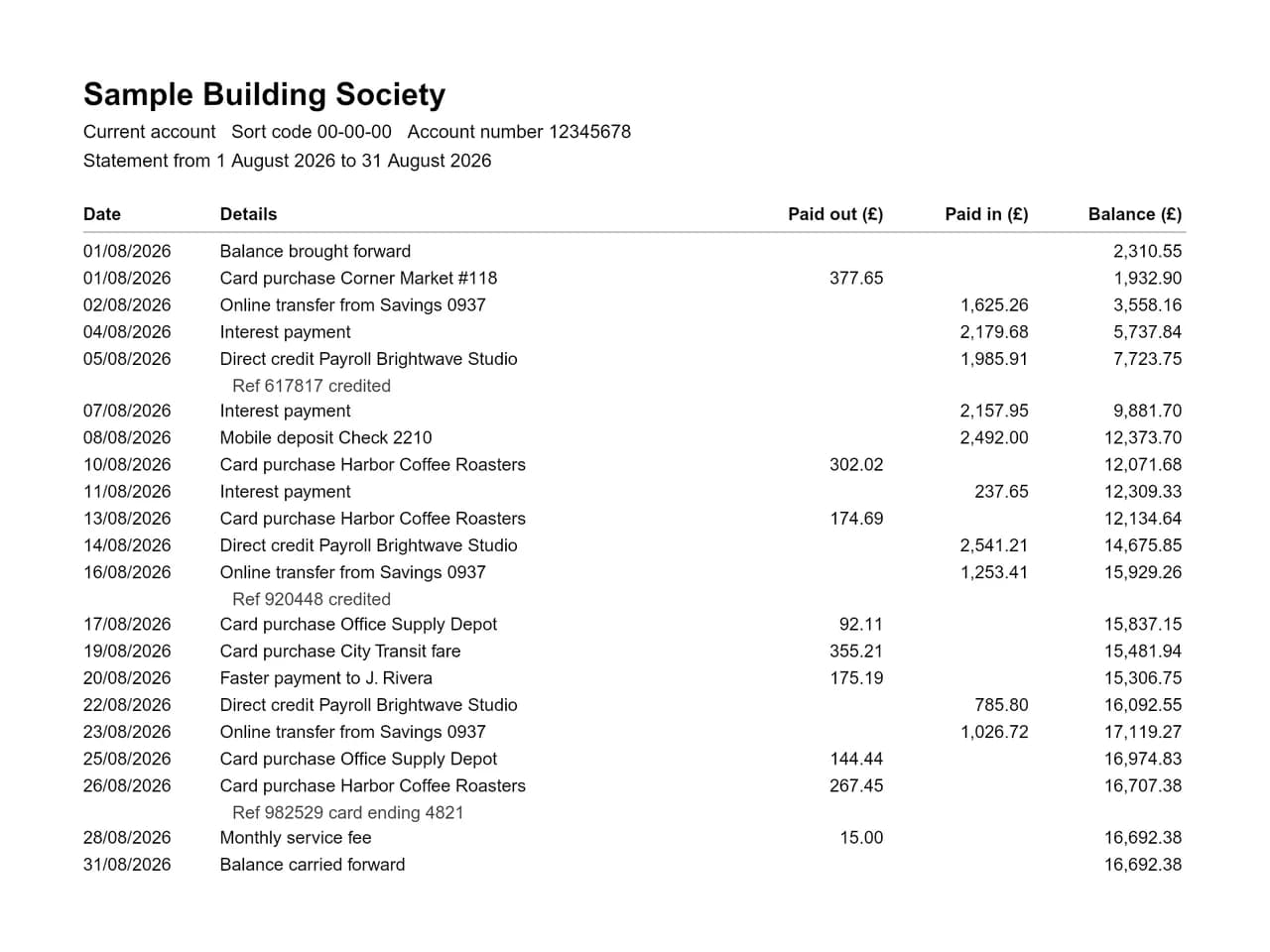
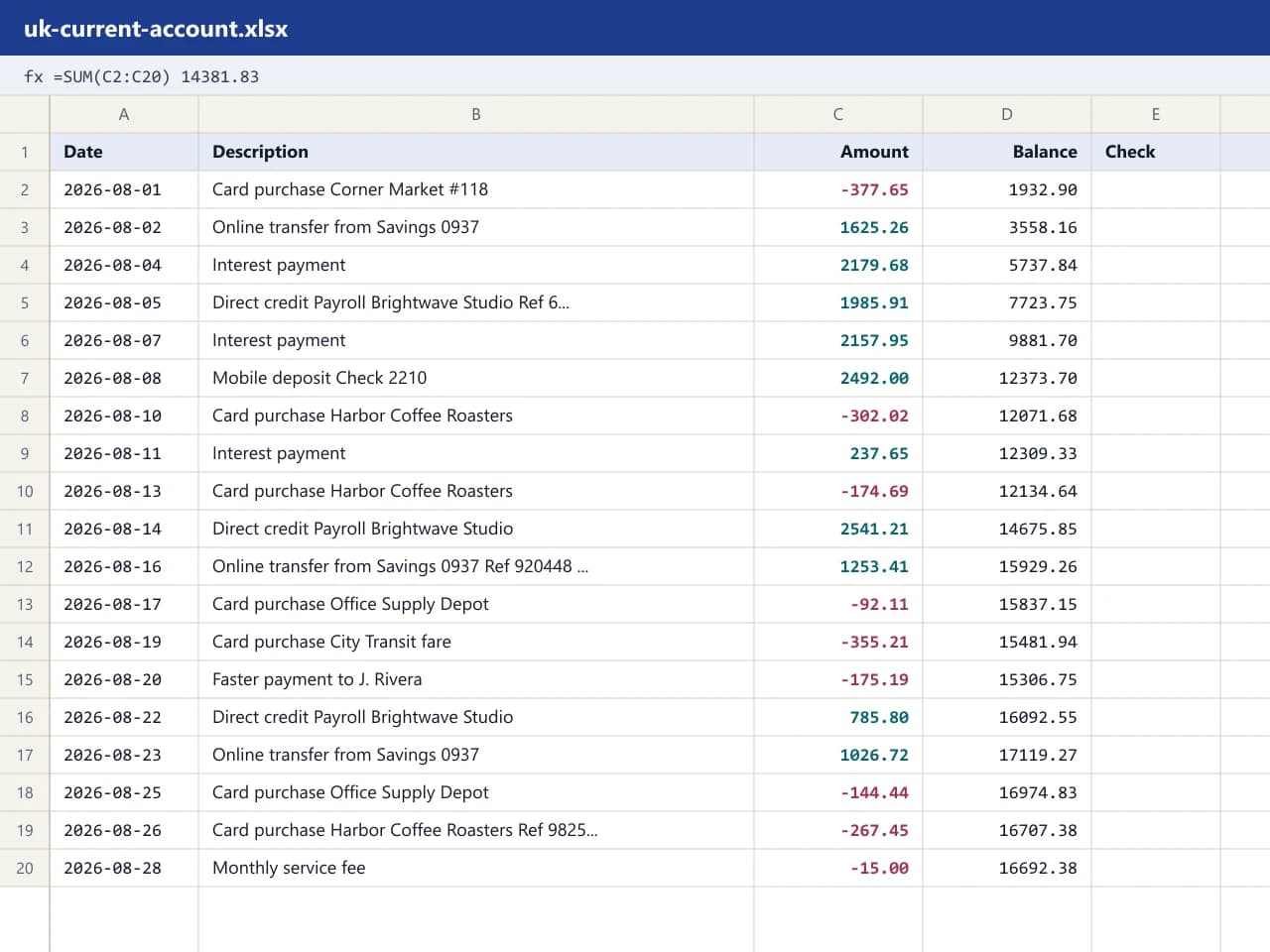 Balanced
- Test input
- uk-current-account.pdf
- Output
- uk-current-account.xlsx
- Rows
- 19
- Money in
- 16285.59
- Money out
- 1903.76
- Pages
- 1
- Currency
- GBP
- Output size
- 9 KB
- Engine time
- 20 ms
How we test: each test statement prints an opening and a closing balance, and the run only counts when the rows add up to both. More on the about page.
Way 1: copy and paste from the PDF
Open the statement, select the transaction lines, copy them, and paste them into a blank sheet. For a short month with a few rows, this works. However, the paste often drops every value into column A, so you then run Data, then Text to Columns, to split the dates, payees and amounts.
The weak spots show up fast. Long descriptions that wrap onto two lines become two rows, minus signs vanish on some layouts, and a missed page is easy to overlook. So if you go this way, add up the Amount column at the end and compare it with the change between the opening and closing balance.
Way 2: Power Query in Excel
Excel for Microsoft 365 includes a PDF connector in Power Query. You pick Data, then Get Data, then From File, then From PDF, and Excel lists the tables it finds on each page. On a clean, simple layout you can load a page as a table in under a minute.
Bank statements rarely stay that clean, though. Each page often shows up as a separate table, headers repeat, and wrapped payee lines still split. You end up with a query to append pages and filter out noise. That effort pays off if you convert the same bank's statement every month, but it takes time to build.
Way 3: how to convert a bank statement to Excel with a converter
A statement converter reads the layout the way a person would. Statesift finds the date, description and amount on each line, joins wrapped lines back to their transaction, and moves check numbers into their own column. It also detects day first dates, such as 14/03 on a UK statement, and month first dates, such as 03/14 on a US one.
Then it checks its own work. The opening balance plus every row must equal the closing balance, and each running balance must match the row above it plus the amount. You see the result as a stamp before you download: Balanced, Check rows, or No balance when the statement prints none.
When this is not the right tool
If your bank offers an Excel or CSV download for the same dates, that file needs no conversion at all, so start there. Paper statements that you scanned, or photos from a phone, need OCR, which our tool does not do yet. For those, ask the bank for a fresh PDF first.
Also, we handle one statement per run and do not categorize spending. If you want a year of rows sorted into budget groups for you, a budgeting app linked to your bank will do more. For turning a stack of PDFs into clean, checked rows, the converter is the faster route.
How to convert a bank statement to Excel: three ways compared
| Method | What to expect |
|---|---|
| Copy and paste | Free, slow, columns often break |
| Power Query | Built into Excel for Microsoft 365, needs cleanup per layout |
| Statesift | Under 2 seconds for a normal statement, checked against the balance |
| Scanned statements | Need OCR first; Statesift has none yet |
| Free use | First statement free, up to 5 pages, with a free account |
How to convert bank statement to Excel FAQ
How do I convert a bank statement to Excel for free?
Upload the PDF here, and your first statement is free with a free account, up to 5 pages. Copy and paste or Power Query cost nothing too, but they take longer and skip the balance check.
How do I keep the columns when I paste a PDF statement into Excel?
Paste first, then use Data, Text to Columns to split the values. A converter skips that step, since it gives you one row per transaction with real dates and numbers.
Why do my dates come out wrong in Excel?
Usually the statement uses day first dates while Excel expects month first, or the other way round. Our converter reads the order from the statement and writes real Excel dates, so 03/04 does not turn into the wrong month.
How long does it take?
A normal statement takes under 2 seconds from upload to download. Our 36 row test statements take about 40 milliseconds inside the engine.
What should I check after converting?
Look at the stamp first. Then compare the row count with the statement and spot check a few amounts. If the stamp says Check rows, look at those rows in the preview before you use the file.