Convert a bank statement to CSV
To convert a bank statement to CSV, upload the PDF from your bank and press Convert. Statesift reads each transaction, checks the rows against the opening and closing balance, and writes a UTF-8 CSV file with ISO dates and signed amounts. The same run also gives you Excel, OFX, QFX, QBO and JSON files.
By The Statesift team (Product and testing). Last updated .
PDF up to 15 MB. Read in memory, never stored.
How to turn a bank statement into a CSV file, step by step
- Save the statement from your online banking as a PDF file.
- Pick the file in the box above, and type the password if the PDF is locked.
- Press Convert, then look at the balance stamp before you download.
- Click CSV to save the file, or grab the Excel and OFX versions from the same run.
Your first statement is free with a free account, up to 5 pages. After that, see the pricing page for prices and plans, or read how we test the tool.
Bank statement to CSV tested with a real statement
We ran one of our own test statements through the same code the tool on this page uses. So the pictures and the numbers below come from that run, not from a mockup.
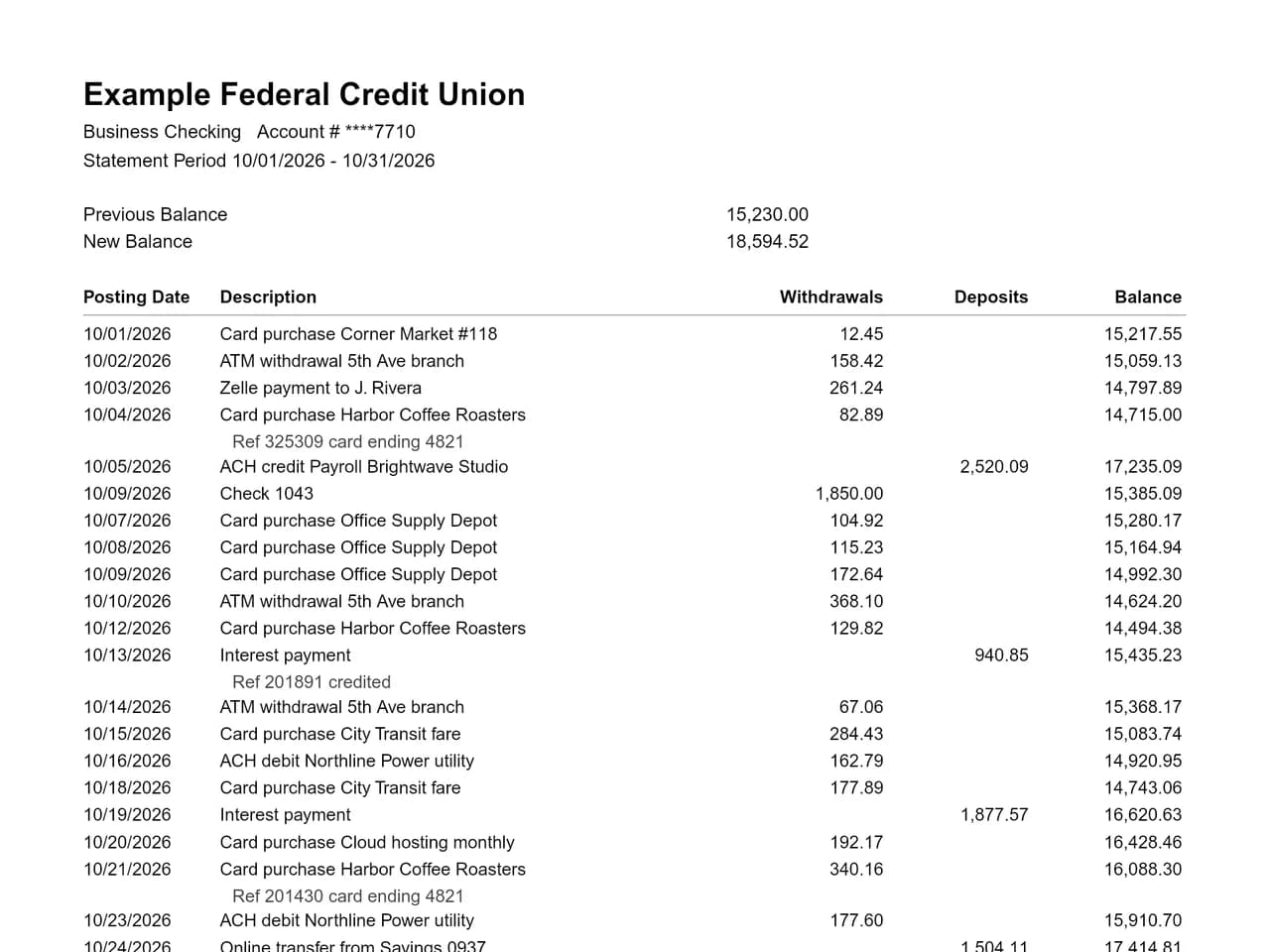
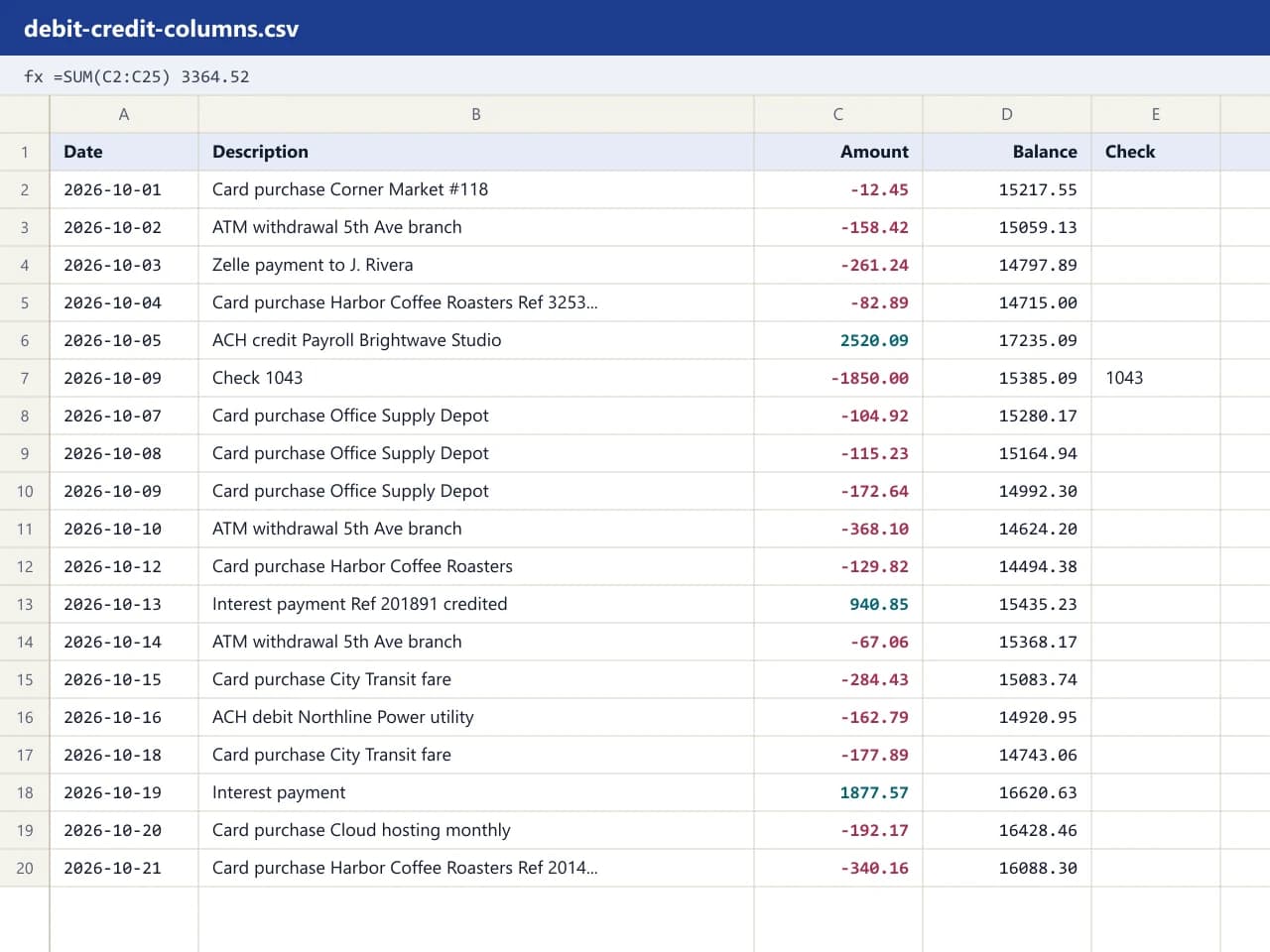 Balanced
- Test input
- debit-credit-columns.pdf
- Output
- debit-credit-columns.csv
- Rows
- 24
- Money in
- 8243.43
- Money out
- 4878.91
- Pages
- 1
- Currency
- USD
- Output size
- 2 KB
- Engine time
- 22 ms
How we test: each test statement prints an opening and a closing balance, and the run only counts when the rows add up to both. More on the about page.
What is inside the bank statement CSV file
The file has one header row and then one line per transaction. The columns are Date, Description, Amount, Debit, Credit, Balance and Check number, in that order. Dates use the ISO form YYYY-MM-DD, such as 2026-03-14, so no program can mix up the third of April with the fourth of March.
Amounts follow one simple rule: money out is negative and money in is positive. For example, a coffee for 4.50 shows as -4.50, while a salary deposit shows as a plain positive number. Also, the file uses UTF-8, so accents in payee names such as café or Zürich come through as they should.
Why the CSV guards against formula cells
Spreadsheets treat a cell that starts with =, +, - or @ as a formula. A payee line on a statement can begin with one of those signs by chance, and a hostile one could even try to run a command on your computer. Security people call this CSV injection, and OWASP lists it as a known attack.
So every text cell that starts with one of those four signs gets a leading apostrophe in our CSV. As a result, spreadsheets show that text as text and do not run it. Amount cells stay plain numbers, even the negative ones, so your sums still work.
Where you can use a bank statement CSV
CSV is plain text, so almost any program can read it. Google Sheets opens it through File, then Import. Excel opens it with a double click, or through Data, then From Text/CSV, when you want to pick the column types yourself. Database tools and short scripts in Python or R read it in one line too.
Because the dates follow ISO 8601, they sort in the right order even as plain text. That helps when you load several months into one table. However, if a program asks how to read the dates, pick year, month, day. When you need frozen headers or a second sheet with totals, take the Excel file from the same run instead.
When this is not the right tool
Many banks let you export a CSV straight from online banking. If yours does, and it covers the dates you need, use it, because no PDF reading takes place. Our converter is for the cases where the bank offers only a PDF, or where the bank export no longer reaches back far enough.
Scanned statements and photos will not convert, since we have no OCR yet. We also take one statement per run, so a folder of fifty PDFs means fifty runs. Finally, the CSV holds the rows as the bank printed them. It does not sort spending into categories, so you would do that in your spreadsheet or bookkeeping tool.
Bank statement to CSV: file details
| Item | Detail |
|---|---|
| Encoding | UTF-8 |
| Date format | YYYY-MM-DD (ISO 8601) |
| Columns | Date, Description, Amount, Debit, Credit, Balance, Check number |
| Signs | Money out negative, money in positive |
| Formula guard | Leading apostrophe on text that starts with = + - @ |
| Also in the run | Excel, OFX, QFX, QBO and JSON |
Bank statement to CSV FAQ
How do I convert a bank statement PDF to CSV?
Upload the PDF above, press Convert and pick CSV from the downloads. Your first statement is free with a free account, up to 5 pages.
Why does my CSV show dates as 2026-03-14?
That is the ISO date format. It reads the same in every country and sorts in order. Excel and Google Sheets turn it into a date when they open the file.
Why do some descriptions start with an apostrophe?
The text began with =, +, - or @. The apostrophe stops a spreadsheet from treating it as a formula, so the file stays safe to open.
Can I open the CSV in Excel?
Yes. Double click it, or use Data, then From Text/CSV, to choose the column types. If you want frozen headers and a totals sheet, download the .xlsx file from the same run.
Is the CSV the same as my bank's own export?
Not always. Each bank picks its own columns and date format. Ours uses the same seven columns for every bank, which makes months from different banks easy to stack.