Convert a bank statement to OFX
To convert a bank statement to OFX, upload the PDF from your online banking and press Convert. Statesift reads every transaction, checks the total against the opening and closing balance, and writes an OFX 1.0.2 file. Most accounting and budgeting apps that take bank files can then import it.
By The Statesift team (Product and testing). Last updated .
PDF up to 15 MB. Read in memory, never stored.
How to convert a bank statement to OFX, step by step
- Download the statement from your online banking as a PDF, not as a scan.
- Drop the file into the converter above. If the PDF asks for a password, type it in the form.
- Press Convert and look at the stamp: Balanced means the rows add up to the closing balance.
- Download the .ofx file, then import it into your accounting or budgeting app.
Your first statement is free with a free account, up to 5 pages. After that, see the pricing page for prices and plans, or read how we test the tool.
Bank statement to OFX tested with a real statement
We ran one of our own test statements through the same code the tool on this page uses. So the pictures and the numbers below come from that run, not from a mockup.
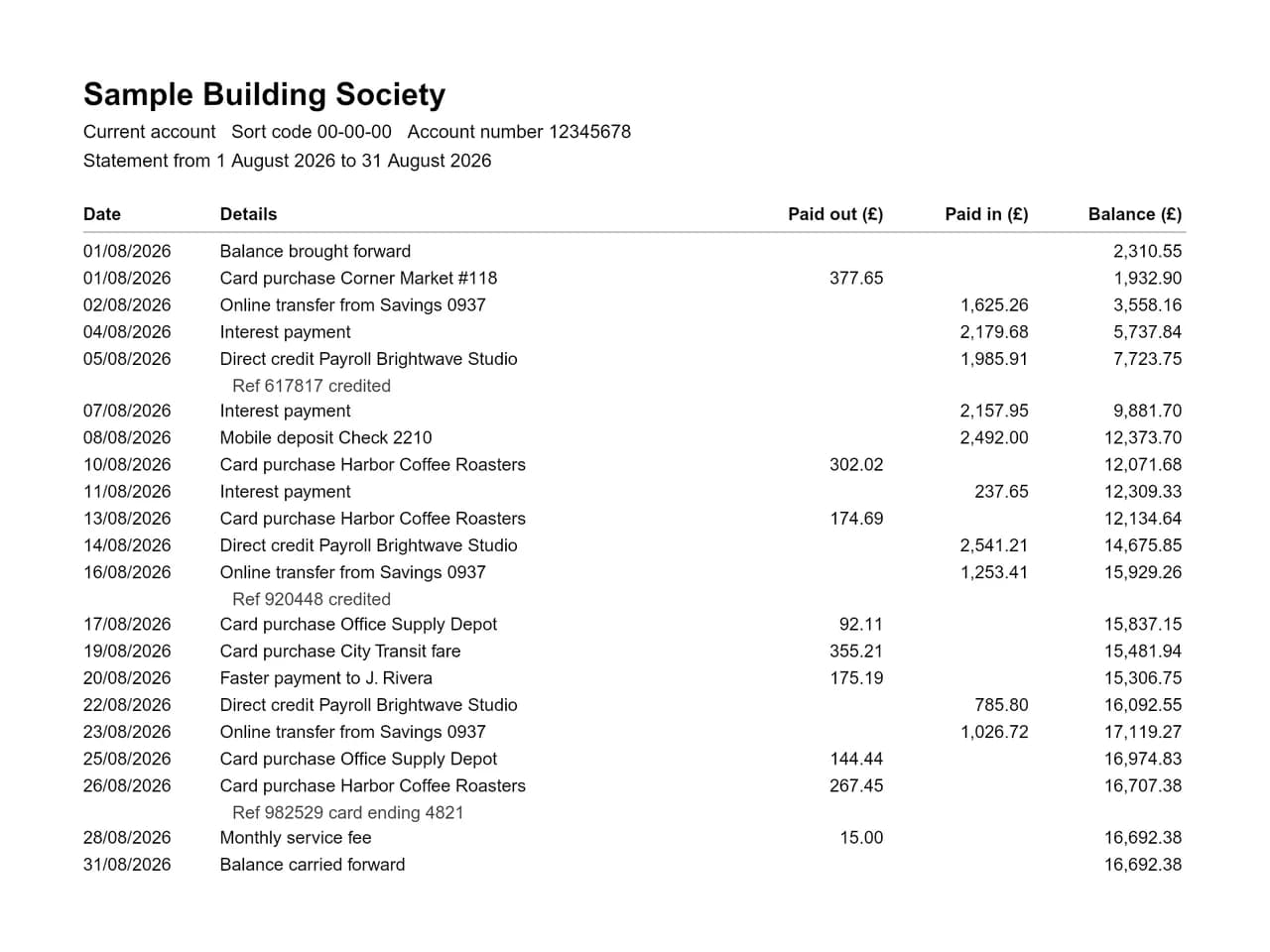
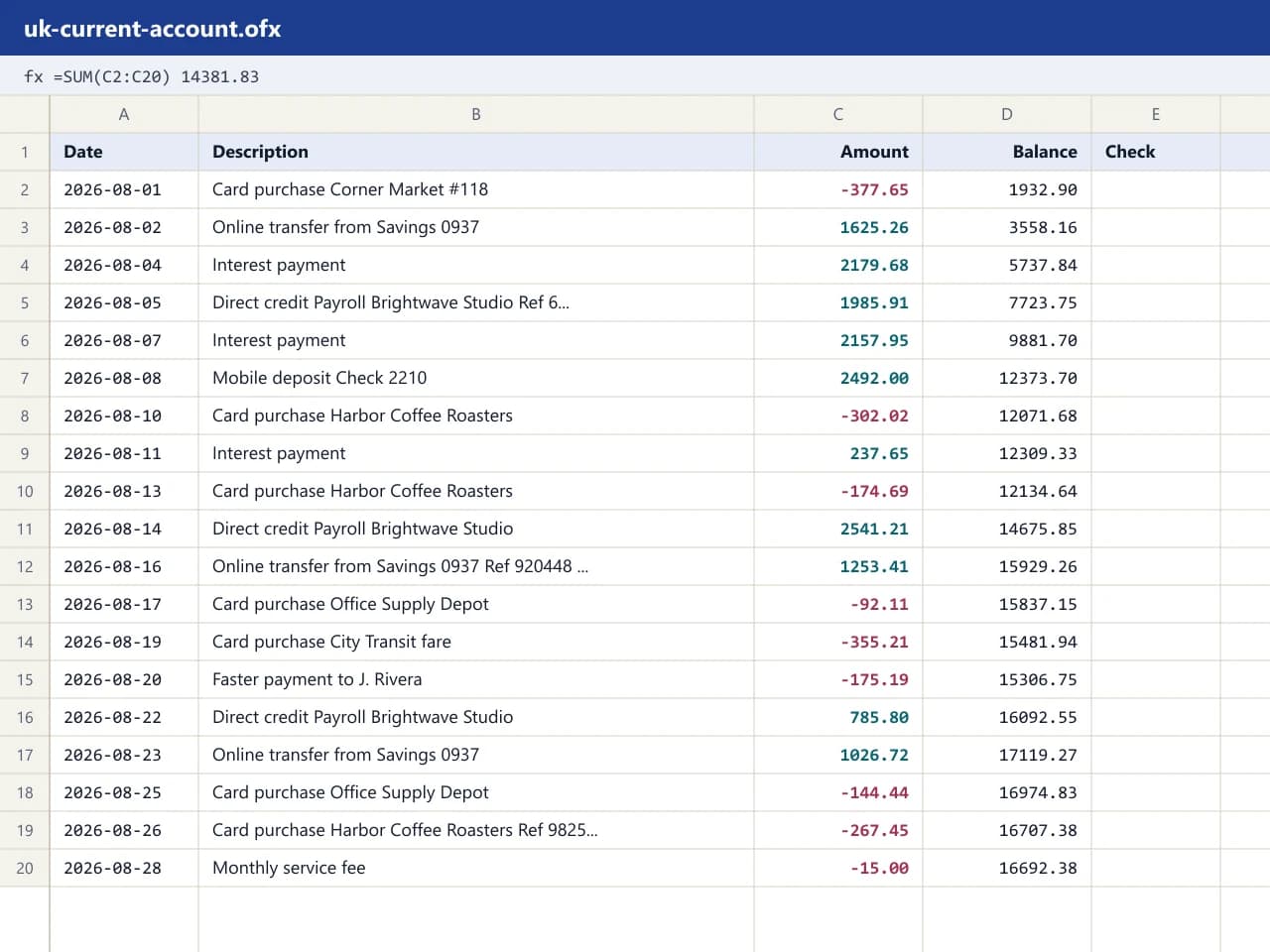 Balanced
- Test input
- uk-current-account.pdf
- Output
- uk-current-account.ofx
- Rows
- 19
- Money in
- 16285.59
- Money out
- 1903.76
- Pages
- 1
- Currency
- GBP
- Output size
- 4 KB
- Engine time
- 18 ms
How we test: each test statement prints an opening and a closing balance, and the run only counts when the rows add up to both. More on the about page.
Why OFX is the safe default for bank files
OFX, short for Open Financial Exchange, is the format banks use when they send statement data to finance software. It names the account, the currency, the period and each transaction in tags that software reads the same way every time. So there are no columns to map and no date format to guess.
That is also why many apps list OFX first in their import screens. For example, Xero takes OFX statement files, and QuickBooks Online lists .ofx among its upload types. A CSV file can work too, but you usually have to tell the app which column holds the date and which holds the amount.
What our OFX file contains
We write OFX 1.0.2, the SGML version that older and newer apps both read. Checking and savings statements use the bank message set, while card statements use the credit card message set. Each row carries a posted date, a signed amount, a unique transaction ID and the description. Check numbers go in their own tag.
The currency comes from the statement itself. For instance, our UK test statement produced a file in GBP, and a US checking statement produces USD. In addition, the ledger balance at the end of the file matches the closing balance printed on the PDF. That gives your app a number to reconcile against right after import.
Checks before you convert a bank statement to OFX
A bank file that skips a row can throw off a reconciliation for months. Therefore every run compares the opening balance plus all rows with the closing balance. When the statement prints a running balance, each line is also tested against the line above it.
The same running balance fixes the sign of each amount, even on layouts that print debits and credits without a minus sign. It also spots statements that list the newest row first. Dates follow the order on the statement, whether month first, day first or ISO, and the year comes from the statement period.
When OFX is not the file you want
Plain OFX has no Intuit bank ID, so QuickBooks Desktop Web Connect and Quicken may refuse it. For those two, download the QBO or QFX file from the same run instead. Also, if your bank offers an OFX download for the period you need, use that, since it skips the PDF step completely.
Finally, a scanned paper statement has no text layer, so we cannot read it yet. We also handle one statement file per run, and we never log in to your bank. If you need years of history in one file, ask the bank for an export first.
Convert bank statement to OFX: key facts
| Item | Detail |
|---|---|
| Input | PDF checking, savings or credit card statement with a text layer |
| Output | OFX 1.0.2 (SGML), plus Excel, CSV, QFX, QBO and JSON in the same run |
| Message set | Bank for checking and savings, credit card for card statements |
| Sign rule | Money out negative, money in positive |
| Free use | First statement free, up to 5 pages, with a free account |
| Paid limit | 60 pages and 15 MB per statement |
Bank statement to OFX FAQ
How do I convert a bank statement to OFX for free?
Upload the PDF here and press Convert. Your first statement is free with a free account, up to 5 pages. A longer statement shows a preview of the first 5 rows, and you can pay for the whole file from $2.99.
Can I convert a PDF to OFX if my bank does not offer OFX?
Yes, that is the main use of this page. As long as the PDF came from online banking and has a text layer, the rows can be read and written to OFX.
What is the difference between OFX, QFX and QBO?
All three share the OFX layout. QFX adds Intuit tags for Quicken, and QBO adds them for QuickBooks. Every run gives you all three, so pick the one your app expects.
Does the OFX file keep my account number?
The file uses the last four digits when the statement prints them, for example XXXX1234. We do not store the statement or the file after you download it.
Which apps import OFX files?
Xero and QuickBooks Online both accept OFX statement files, and many budgeting apps do too. For QuickBooks Desktop or Quicken, use the QBO or QFX file instead.