Bank statement parser for JSON and CSV
This bank statement parser reads a PDF statement and returns structured rows you can load into code or a database. Upload the file, press Convert and download the JSON or CSV. Each transaction has an ISO date, a signed amount and its page number, and the file also includes a balance check you can verify.
By The Statesift team (Product and testing). Last updated .
PDF up to 15 MB. Read in memory, never stored.
How to parse a bank statement into JSON, step by step
- Download the statement PDF from online banking. It needs a text layer, so scans will not work.
- Drop the PDF into the box above, with its password if the bank locked it.
- Press Convert and read the stamp: Balanced, Check rows or No balance.
- Download the JSON for code, or the CSV for a database load or a notebook.
Your first statement is free with a free account, up to 5 pages. After that, see the pricing page for prices and plans, or read how we test the tool.
Bank statement parser tested with a real statement
We ran one of our own test statements through the same code the tool on this page uses. So the pictures and the numbers below come from that run, not from a mockup.
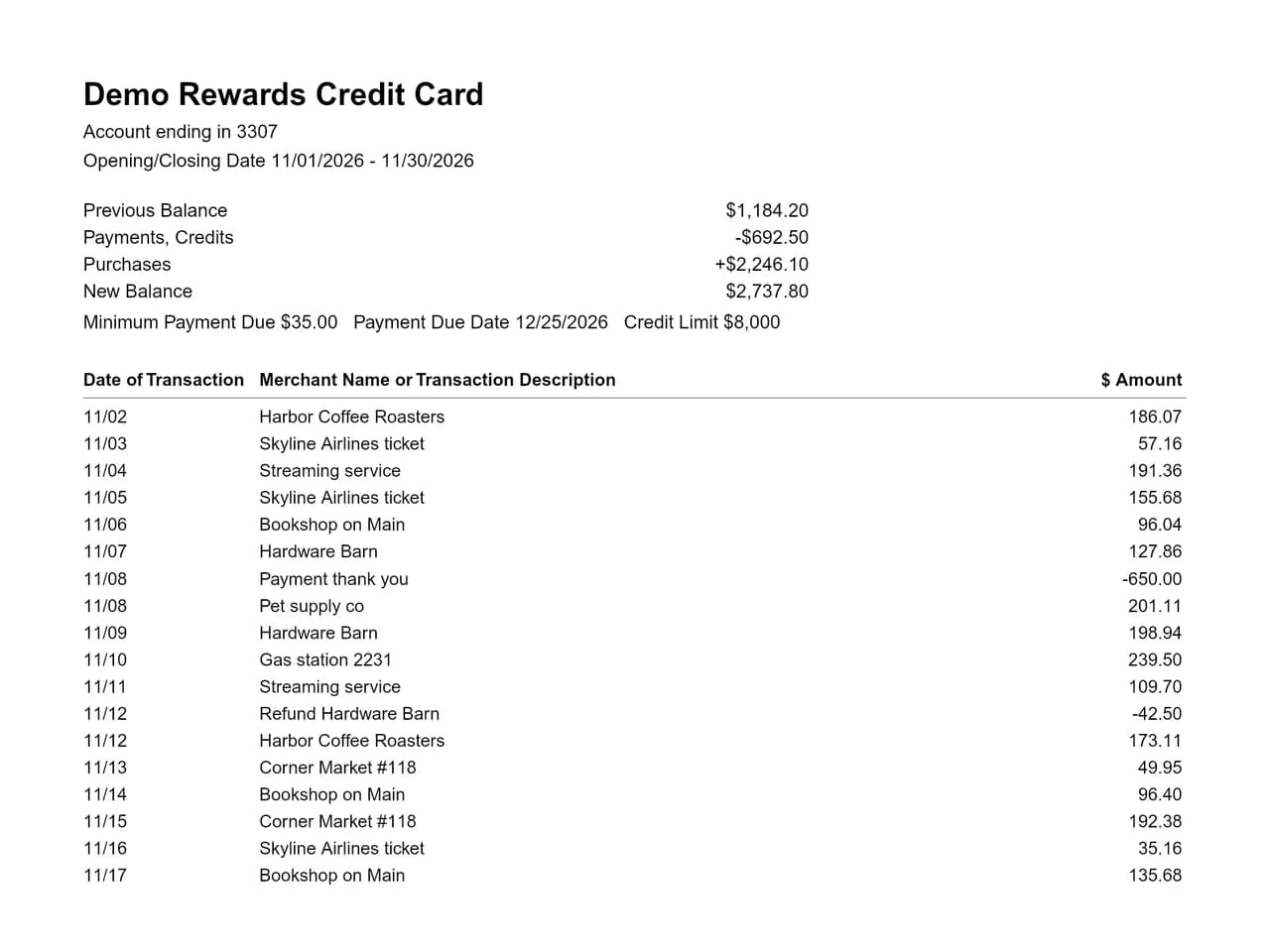
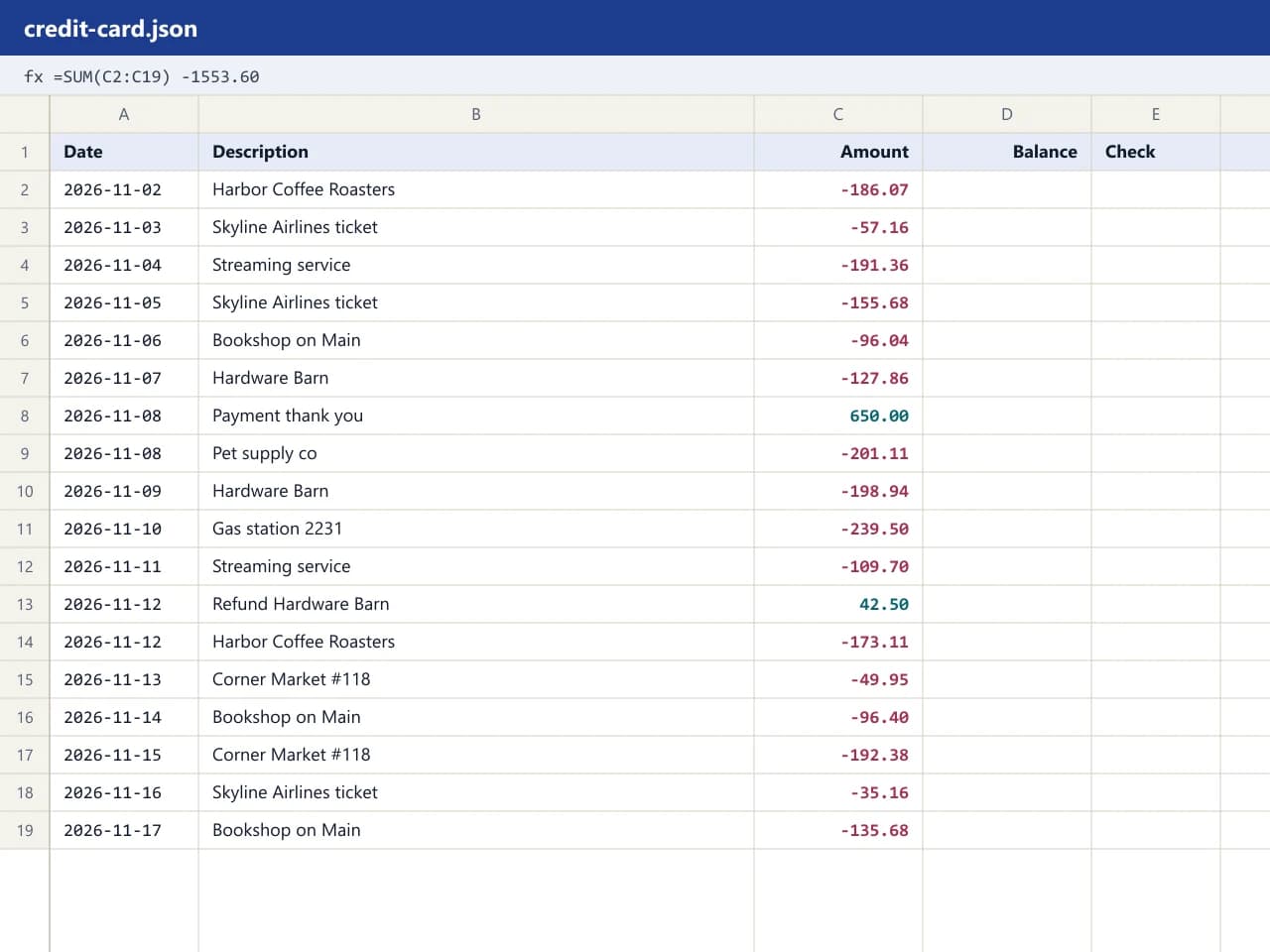 Balanced
- Test input
- credit-card.pdf
- Output
- credit-card.json
- Rows
- 18
- Money in
- 692.50
- Money out
- 2246.10
- Pages
- 1
- Currency
- USD
- Output size
- 3 KB
- Engine time
- 18 ms
How we test: each test statement prints an opening and a closing balance, and the run only counts when the rows add up to both. More on the about page.
What the bank statement parser returns
The JSON file holds one object for the whole statement. At the top level you get kind (checking, savings or credit-card), currency, accountLast4, periodStart, periodEnd, dateOrder and pages. The field dateOrder tells you how the statement wrote dates: MDY, DMY or YMD. Fields the statement does not print, such as the last four digits, come back as null.
Next comes the transactions array. Each item has date, description, amount, balance, check and page. Dates are ISO strings like 2026-03-31, and amounts are numbers, negative for money out and positive for money in. The balance field holds the running balance when the statement prints one, otherwise null. Finally, page is 1-based, so you can trace any row back to the PDF.
The check and totals objects
Every run also returns a check object with status, opening, closing, computedClosing, mismatches and note. Here, computedClosing is the opening balance plus the sum of all amounts. The status reads passed when the printed balances agree, failed when at least one does not, and unchecked when the statement gives nothing to compare.
Because of that, you can test a file in code before you trust it. For example, compare computedClosing with closing, or reject any file where mismatches is above zero. The totals object adds moneyIn, moneyOut and net. Note that moneyOut is a positive sum, while net keeps its sign.
How the bank statement parser reads a PDF
Statement layouts vary a lot, so the parser does more than split lines on spaces. It joins wrapped description lines to their transaction and moves check numbers into their own field. It also takes the year from the statement period, so a December to January statement gets the right year on every row.
The running balance does extra work as well. It fixes the sign of each amount on layouts that print no minus signs, and it spots statements that list the newest row first. Our 36 row test statement parses in about 40 ms of engine time, and a normal statement takes under 2 seconds end to end.
When this is not the right tool
There is no public API yet. You upload one statement at a time in the browser and download the files, so this does not fit a pipeline that has to run unattended. If you need that today, look for a service that offers an API, or ask your bank for OFX or CSV exports, which are already structured.
Scanned and photographed statements are also out of reach for now, because we do not run OCR. Likewise, we do not categorize spending or connect to bank accounts. What you get is a clean, checked set of rows, and the rest of the analysis stays in your own code.
Bank statement parser output fields
| Field | Meaning |
|---|---|
| kind, currency, accountLast4 | Account type, currency code, last four digits or null |
| periodStart, periodEnd, dateOrder, pages | Statement period as ISO dates, date order (MDY, DMY, YMD), page count |
| transactions[] | date, description, amount, balance, check, page |
| check | status, opening, closing, computedClosing, mismatches, note |
| totals | moneyIn, moneyOut, net |
| Other formats in the same run | CSV (UTF-8, ISO dates), Excel, OFX, QFX and QBO |
Bank statement parser FAQ
Is there an API for the bank statement parser?
Not yet. Today you upload a PDF in the browser and download the JSON or CSV.
How do I parse a PDF bank statement into JSON?
Upload the PDF here and press Convert. The download list includes a .json file with the statement fields, every transaction and the balance check result.
What date format does the JSON use?
All dates are ISO 8601 strings in YYYY-MM-DD form. The original order on the statement sits in the dateOrder field, as MDY, DMY or YMD.
Are amounts signed in the parsed output?
Yes. Money out is negative and money in is positive. On card statements, purchases are negative and payments or refunds are positive.
Can it parse credit card statements?
Yes. Our test file for this page is a card statement with 18 rows, and the balance check passed. The kind field then reads credit-card.