ChatGPT bank statement to Excel: when it works and when to use a converter
ChatGPT can turn a bank statement into an Excel table: you upload the PDF and ask for one row per transaction. It works for a short statement or a quick question. However, it gives no balance check, and your financial data goes to a chat service. A dedicated converter checks every row against the printed balances and keeps nothing.
By The Statesift team (Product and testing). Last updated .
PDF up to 15 MB. Read in memory, never stored.
How to check a ChatGPT bank statement to Excel result, step by step
- Note the opening balance, the closing balance and the number of transactions printed on your statement.
- Add up the Amount column in the sheet ChatGPT gave you, or in the sheet from the converter above.
- Confirm that the opening balance plus that total equals the closing balance, and that the row count matches.
- If either check fails, find the missing or misread rows before you use the sheet for taxes or bookkeeping.
Your first statement is free with a free account, up to 5 pages. After that, see the pricing page for prices and plans, or read how we test the tool.
ChatGPT bank statement to Excel tested with a real statement
We ran one of our own test statements through the same code the tool on this page uses. So the pictures and the numbers below come from that run, not from a mockup.
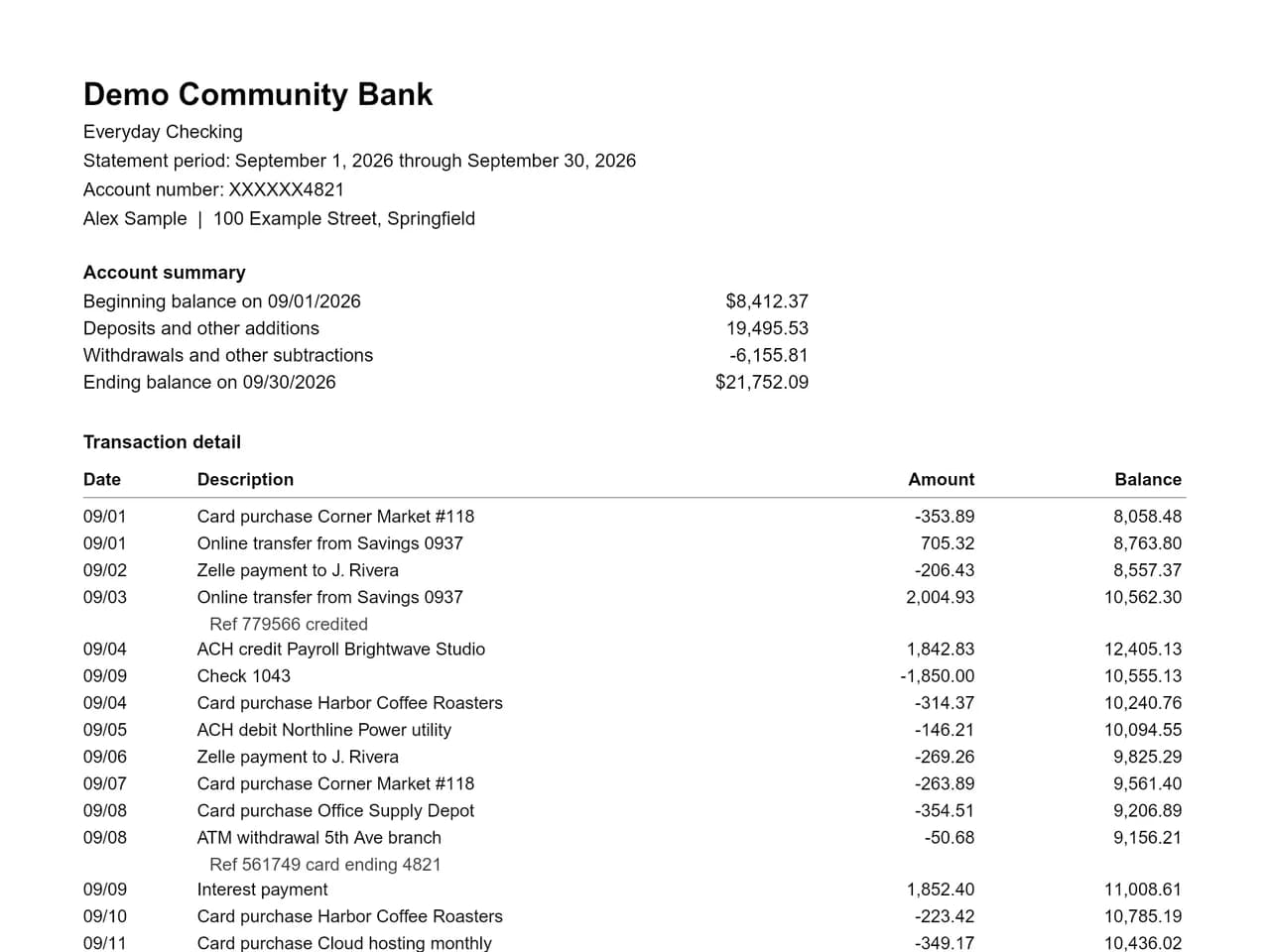
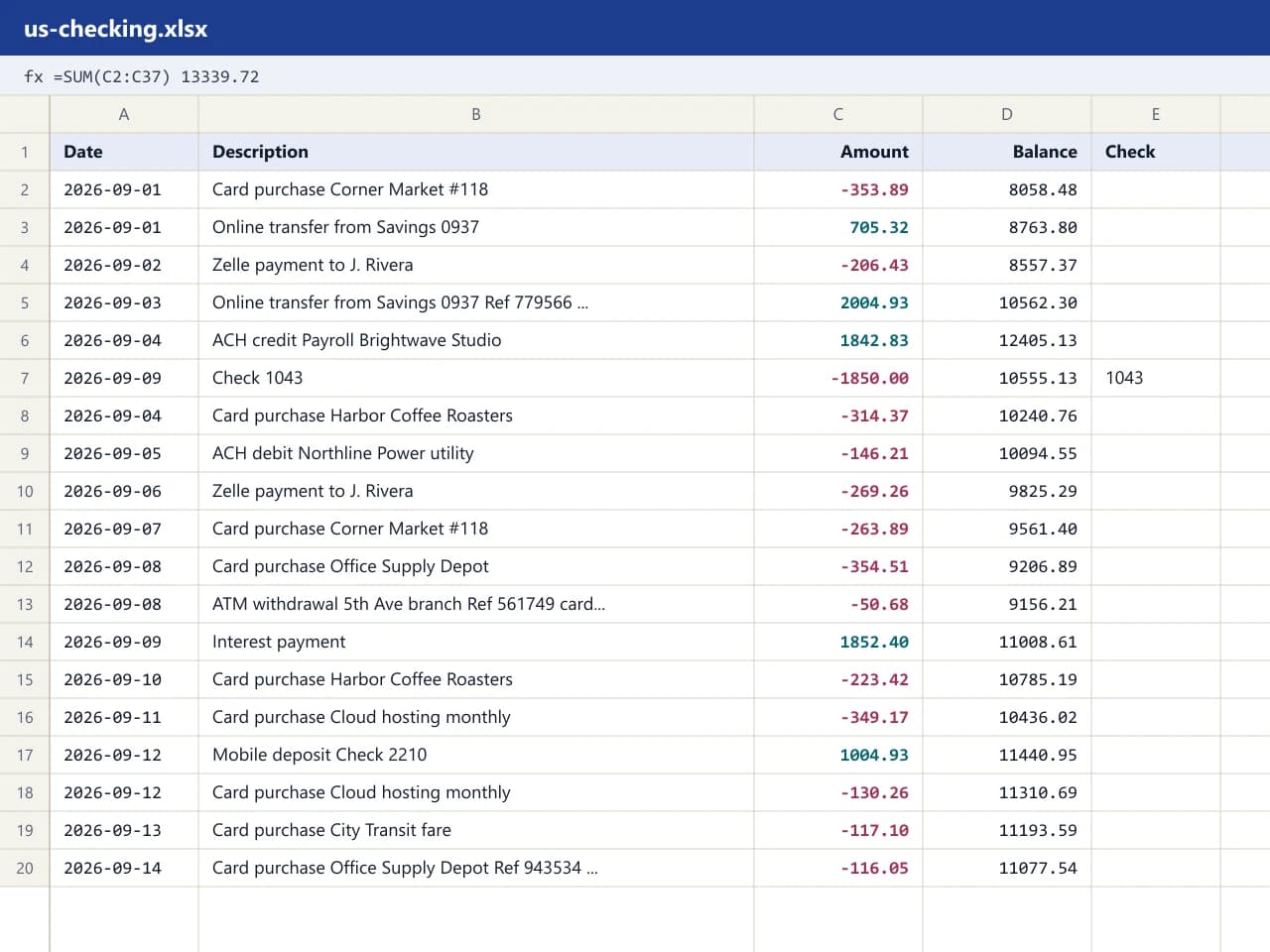 Balanced
- Test input
- us-checking.pdf
- Output
- us-checking.xlsx
- Rows
- 36
- Money in
- 19495.53
- Money out
- 6155.81
- Pages
- 2
- Currency
- USD
- Output size
- 9 KB
- Engine time
- 21 ms
How we test: each test statement prints an opening and a closing balance, and the run only counts when the rows add up to both. More on the about page.
How the ChatGPT bank statement to Excel method works
The usual method is simple. You attach the PDF, ask ChatGPT to list every transaction with date, description and amount, and then ask for an .xlsx download. OpenAI's file upload guide says ChatGPT reads PDFs, including the text and images inside them, and that it can work with spreadsheets too.
For a one page statement with a clean layout, the result is often fine. Still, the output is a guess built from the page, not a parse with rules. OpenAI's own terms say the service may give incomplete or incorrect output and that you must check it before you rely on it. So the real work starts after the table appears.
Where a chat answer can go wrong with bank numbers
Bank statements are full of traps for a general model. A description can wrap onto a second line, a check number can look like an amount, and a debit column can sit next to a credit column with no minus signs. Any of these can shift a value into the wrong place, and a single swapped digit still looks normal in a sheet.
In addition, long statements bring more risk. A month with two hundred rows may come back shorter than the original, so always compare the row count. A chat answer also has no built in balance check. By contrast, our converter adds the rows to the opening balance, compares the result with the closing balance and checks each running balance line by line.
Privacy: uploading a bank statement to a chat service
A statement shows your name, address, account number and every place you spend money. When you upload it to ChatGPT, it becomes part of a chat on OpenAI's servers. According to OpenAI's data controls page, personal Free, Plus and Pro accounts share content for model training by default, unless you turn off the setting called Improve the model for everyone.
OpenAI also notes that files saved to your Library can stay after you delete the chat that used them. Business, Enterprise and Edu workspaces do not train on content by default. Our approach is different: we read the PDF in memory, return the files and discard the upload, with no copy on disk.
When ChatGPT is the better choice
To be fair, a chat tool does some things we do not. For example, it can read a scanned or photographed statement, which our converter cannot do yet. It can also answer a question in plain words, such as how much went to groceries in May, without you building a single formula.
So use ChatGPT for a quick look at a short statement, for a scan, or for questions about data you already checked. Then switch to a dedicated converter when the numbers have to be right, when the statement runs long, or when you need QBO, QFX or OFX files for accounting software. Also keep in mind that OpenAI's help page limits free accounts to 3 file uploads per day.
ChatGPT bank statement to Excel vs Statesift
| Question | ChatGPT vs Statesift |
|---|---|
| Balance check | ChatGPT: none built in. Statesift: opening, closing and every running balance |
| Scanned statements | ChatGPT: reads images in PDFs. Statesift: no OCR yet |
| Training on your data | ChatGPT Free, Plus, Pro: on by default, can be turned off. Statesift: never |
| Storage | ChatGPT: stays in chat history until you delete it. Statesift: discarded after the response |
| Output formats | ChatGPT: whatever you ask for. Statesift: Excel, CSV, QBO, QFX, OFX, JSON |
| Free limit | ChatGPT Free: 3 file uploads a day. Statesift: first statement free, up to 5 pages |
ChatGPT bank statement to Excel FAQ
Can ChatGPT convert a bank statement to Excel?
Yes. Upload the PDF and ask for a table with one row per transaction, then a download. Check the totals against the printed balances afterwards, because the answer can skip or misread rows.
Is it safe to upload my bank statement to ChatGPT?
That depends on your settings and plan. Personal accounts share chats for training by default unless you switch that off. At the very least, turn off Improve the model for everyone and delete the file from your Library when you finish.
What prompt should I use for a ChatGPT bank statement to Excel export?
Ask for every transaction with date, description and signed amount, money out negative, and nothing summarized. Then ask it to add the opening balance to the total and compare that with the closing balance.
Why are some rows missing from the ChatGPT table?
Long statements, wrapped lines and page breaks often cause it. Compare the row count with the statement, or use a converter that checks the running balance and points to the rows that disagree.
Can ChatGPT make a QBO file for QuickBooks?
It can write text that looks like one, but QuickBooks needs exact tags and a bank ID. A converter built for the format gives you a QBO, QFX and OFX file from the same run.