Convert OFX to PDF
To convert OFX to PDF, upload the .ofx file from your bank or finance app and press Convert. Statesift reads both the older SGML and the newer XML versions of the format, then prints every transaction into a clean report with dates, payees and money in and out. Excel and CSV copies come with it.
By The Statesift team (Product and testing). Last updated .
OFX, QFX, QBO up to 15 MB. Read in memory, never stored.
How to convert OFX to PDF, step by step
- Export or download the .ofx file from your bank, card issuer or money app.
- Drop it into the converter above. QFX and QBO files are fine too.
- Press Convert and glance at the preview to confirm the period and the row count.
- Download the PDF report, or choose Excel, CSV or another bank file format from the same result.
Your first statement is free with a free account, up to 5 pages. After that, see the pricing page for prices and plans, or read how we test the tool.
OFX to PDF tested with a real statement
We ran one of our own test bank files through the same code the tool on this page uses. So the pictures and the numbers below come from that run, not from a mockup.
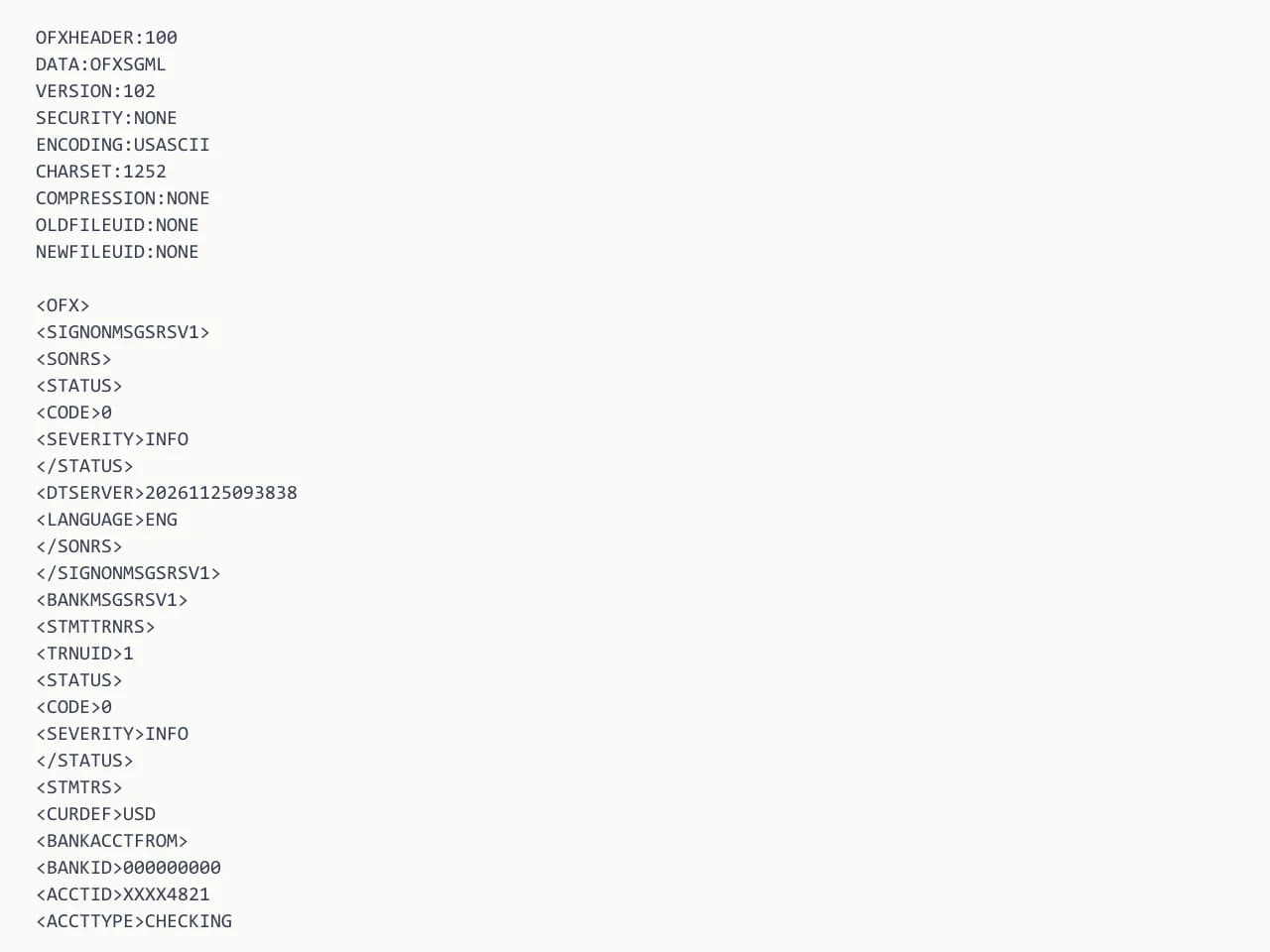
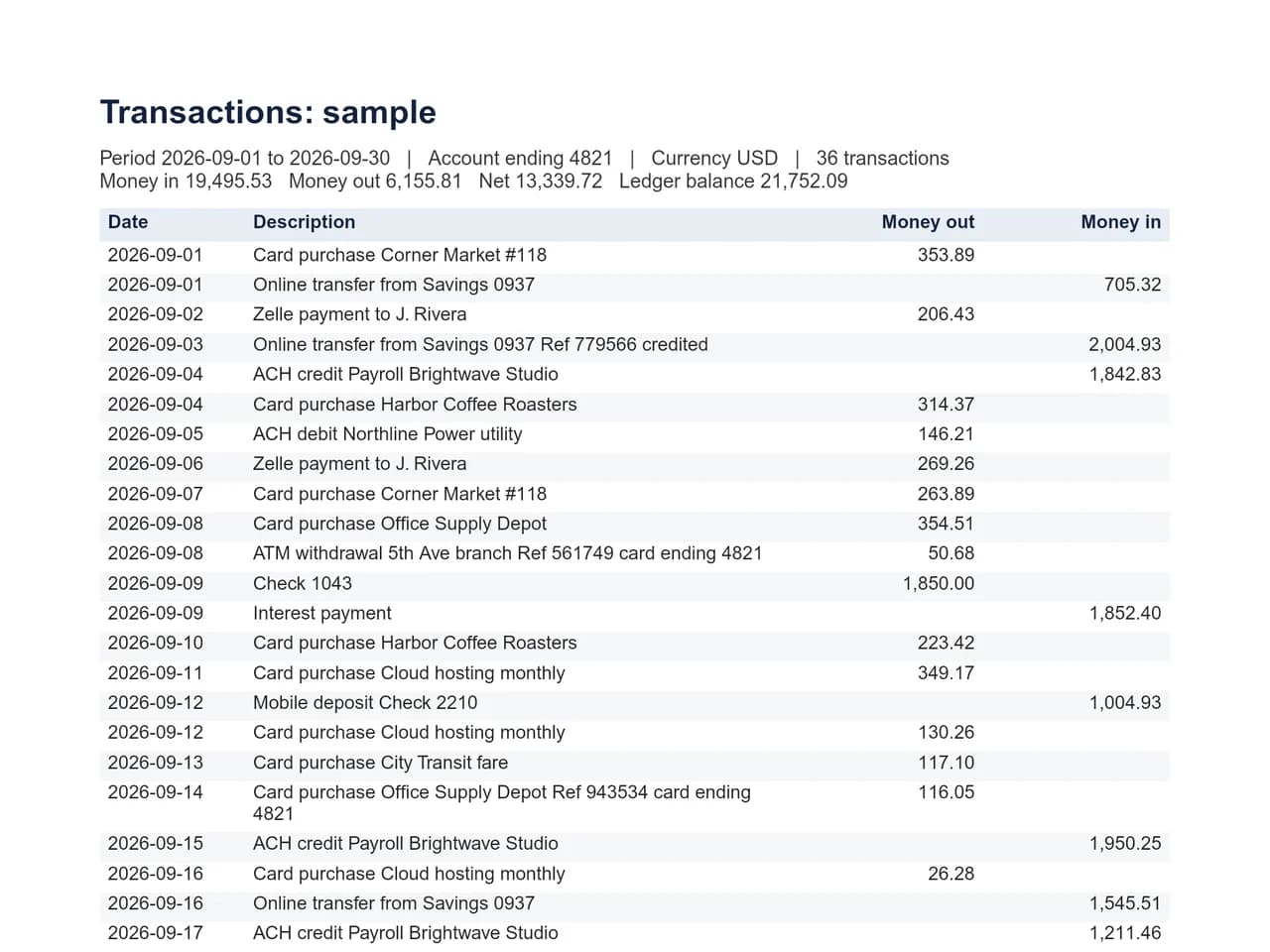
- Test input
- sample.ofx
- Output
- sample.pdf
- Rows
- 36
- Money in
- 19495.53
- Money out
- 6155.81
- Currency
- USD
- Output size
- 3 KB
- Engine time
- 22 ms
How we test: each test statement prints an opening and a closing balance, and the run only counts when the rows add up to both. More on the about page.
OFX is an open standard, so files come from many places
OFX stands for Open Financial Exchange. Banks, card issuers and money apps have used it since 1997, and the Financial Data Exchange says more than 7,000 financial institutions run it today. Because the spec is public, any app can write an OFX file. That is also why the files you meet can look quite different from each other.
For example, older files follow version 1 of the spec, which uses SGML and often leaves out closing tags. Newer files follow version 2 and use proper XML. Some apps also add their own fields. Our reader handles both versions and picks out the parts that matter: dates, amounts, payee names, memos, check numbers and the ledger balance.
When an OFX to PDF report helps
A report helps most when the file has to reach a person, not a program. Say an accountant asks what moved through an account in March, or a family member needs to see shared bills. Rather than send a file they cannot open, you send a PDF that works on any phone or laptop.
It also helps when an app turns your file away. For instance, Intuit's help page says QuickBooks Desktop Web Connect reads only .qbo files, so a plain .ofx file will not import there. In that case, an OFX to PDF report shows you what the file holds first. Then you can take the QBO copy from the same run if you still want to try QuickBooks.
What you see in the OFX to PDF report
At the top, the report names the period, the account ending, the currency and how many transactions the file holds. Right below, you get money in, money out, the net change and the ledger balance whenever the file has one. As a result, you can check the totals against your own notes in a few seconds.
The body is a simple table with Date, Description, Money out and Money in. Rows run from oldest to newest, even when the file lists them in another order. Each amount goes in exactly one column, so a refund never hides as a stray minus sign. Finally, the pages use Letter size and repeat the header, which keeps a long printout easy to follow.
When this is not the right tool
If your bank offers its own PDF statement for the same month, that file is the better record, since the bank issued it. Our report only restates the data inside the OFX file. Likewise, if your goal is to load the rows into an app that reads OFX, import the file directly and skip the PDF.
Also note what an OFX file lacks. It has no running balance on each line, so we cannot test the rows one by one against a printed balance. We show the ledger balance and work the opening balance back from it. When you need that stricter check, convert the PDF statement from your bank on our main converter.
OFX to PDF at a glance
| Item | Detail |
|---|---|
| Input | OFX 1.x (SGML) or 2.x (XML), plus QFX and QBO |
| Account types | Checking, savings and credit card files |
| Main output | Printable PDF report, Letter size |
| Report columns | Date, Description, Money out, Money in |
| Also included | Excel, CSV, OFX, QFX, QBO and JSON |
| Limit | One file per run |
OFX to PDF FAQ
How do I open an OFX file?
Money apps open OFX files for import, but to simply read one, upload it here. You get a PDF report and an Excel file, so you can see every transaction without installing anything.
Can I convert OFX to PDF for free?
Yes. Your first file is free with a free account. Each run handles one OFX file.
Does it work with OFX version 2 XML files?
Yes. The converter reads version 1 files written in SGML and version 2 files written in XML. You do not need to tell it which one you have.
Why won't QuickBooks Desktop import my OFX file?
Intuit says Web Connect in QuickBooks Desktop reads only .qbo files. Upload the OFX file here to read the PDF report first. Then you can try the QBO copy from the same result.
Is my OFX file stored anywhere?
No. We read it in memory, return your files and then discard it. We never write it to disk or ask for a bank login.