Convert a credit card statement to Excel
To convert a credit card statement to Excel, upload the PDF from your card issuer and press Convert. Statesift lists every purchase, payment and refund in its own row, signs purchases as negative and payments as positive, and checks the result against the statement's balances. You download a ready .xlsx file.
By The Statesift team (Product and testing). Last updated .
PDF up to 15 MB. Read in memory, never stored.
How to export a credit card statement to Excel, step by step
- Open your card account online and save the monthly statement as a PDF.
- Drop the PDF into the box above, with its password if it has one.
- Press Convert and read the stamp to see if the rows match the new balance.
- Download the .xlsx file and filter or pivot the Transactions sheet as you need.
Your first statement is free with a free account, up to 5 pages. After that, see the pricing page for prices and plans, or read how we test the tool.
Credit card statement to Excel tested with a real statement
We ran one of our own test statements through the same code the tool on this page uses. So the pictures and the numbers below come from that run, not from a mockup.
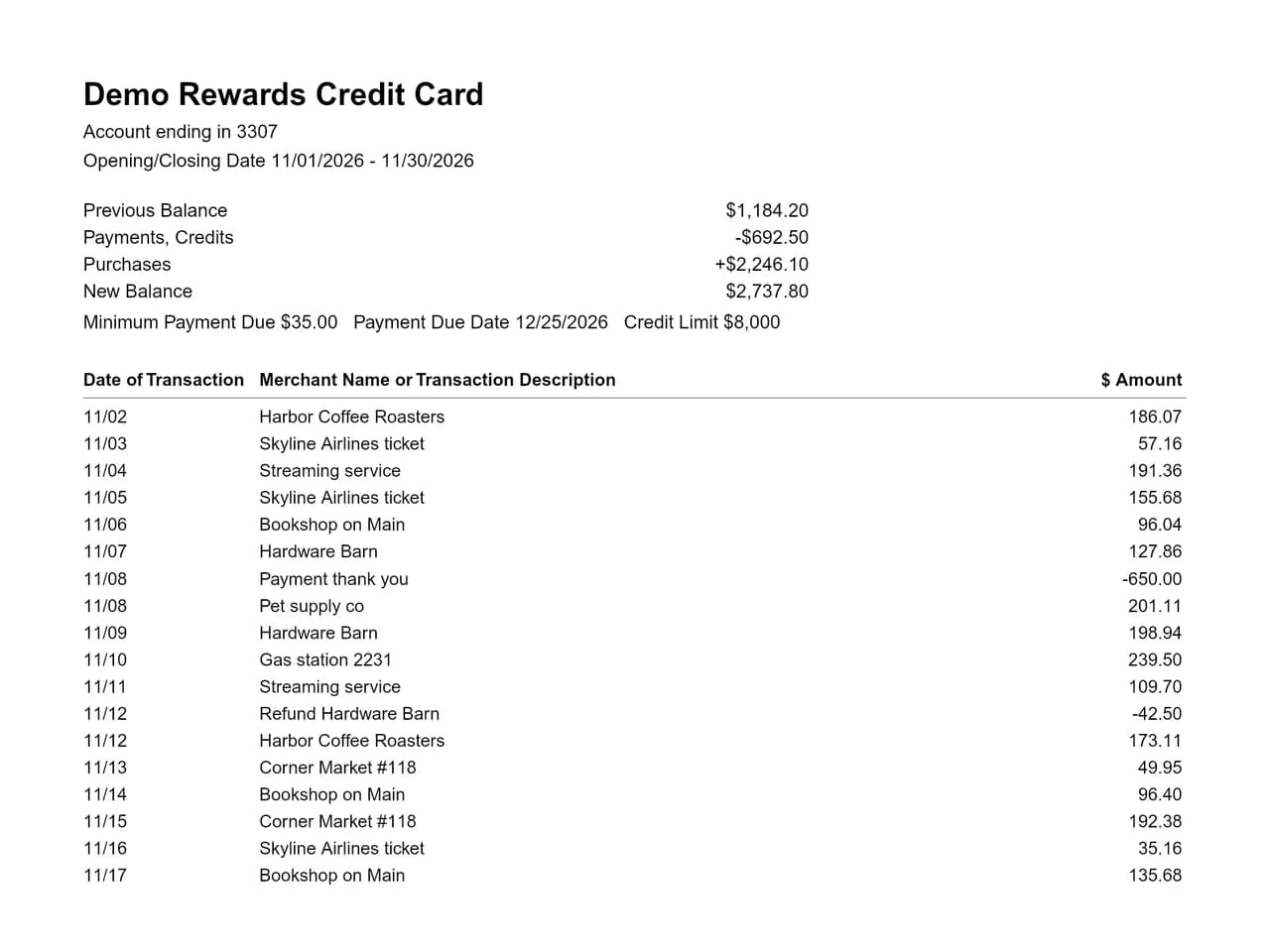
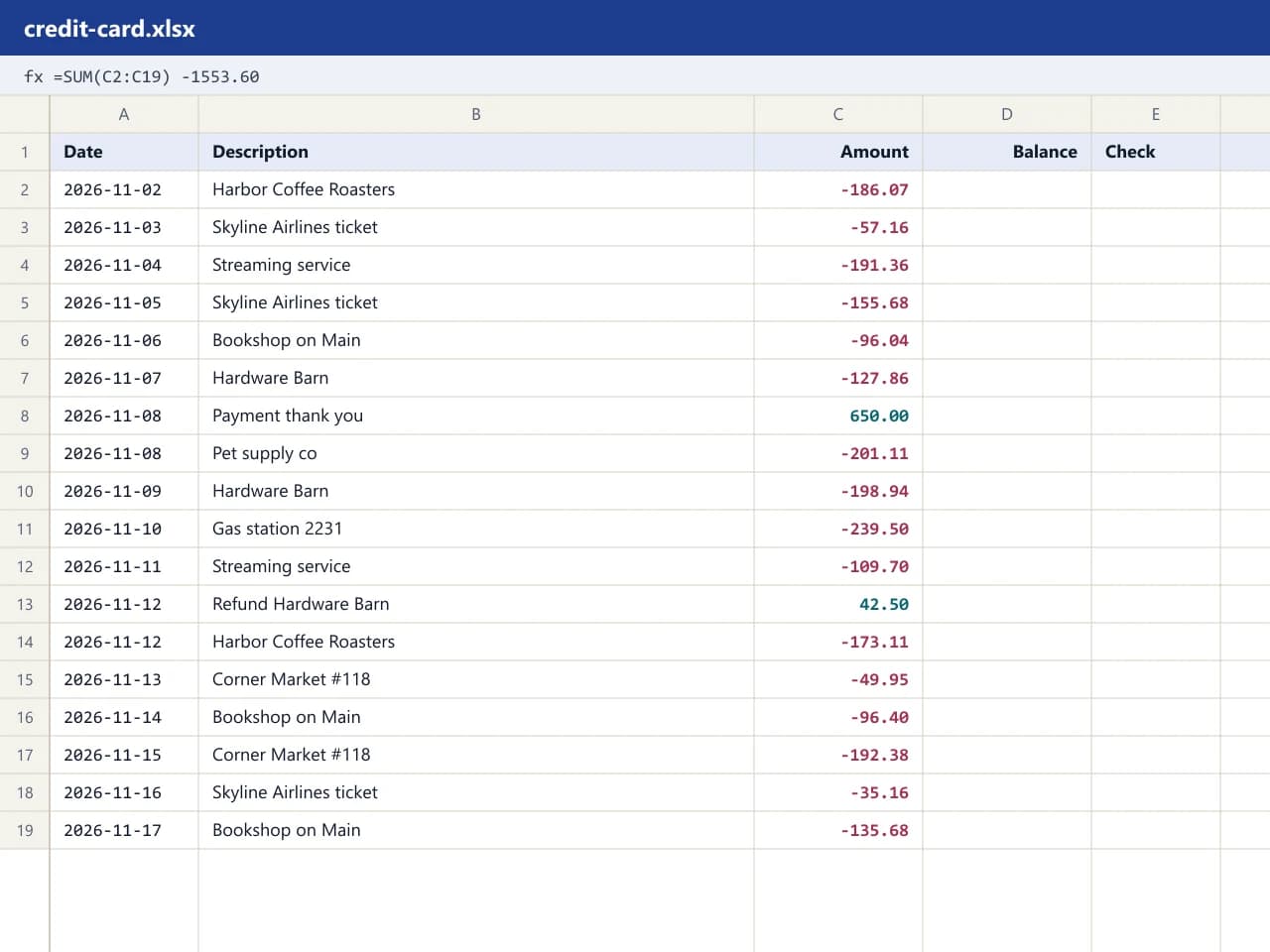 Balanced
- Test input
- credit-card.pdf
- Output
- credit-card.xlsx
- Rows
- 18
- Money in
- 692.50
- Money out
- 2246.10
- Pages
- 1
- Currency
- USD
- Output size
- 8 KB
- Engine time
- 17 ms
How we test: each test statement prints an opening and a closing balance, and the run only counts when the rows add up to both. More on the about page.
How signs work on a credit card statement in Excel
Card issuers print charges as plain positive numbers, because a purchase raises what you owe. Payments and refunds often appear with a minus sign or the letters CR. Put that straight into a sheet and spending looks like income, which confuses any total.
So the converter flips the view to match a checking account. Purchases come out negative, while payments and refunds come out positive. As a result, you can paste card rows next to bank rows, and one SUM tells you the true net cash flow. The Debit and Credit columns repeat the same split, for anyone who wants the two apart.
Balance check on card statements
A card statement has a previous balance, a new balance, and the activity in between. The tool adds up every row and compares the result with those two figures. If they agree, you see the Balanced stamp. If not, the stamp reads Check rows, and you know to look closer before you file anything.
When the statement also prints a running balance, each row must match the one above it plus its amount. That second test catches a single misread line. However, when a statement prints no balance anywhere, the stamp says No balance, so you never mistake an unchecked file for a checked one.
What people use the card sheet for
Most people want the rows for one of three jobs. The first is an expense report, where you filter the sheet to business charges and copy them into a claim. Next comes tax records, since the IRS lists credit card statements among the papers that can back up a business expense. Last, there is a plain budget, where a pivot table by payee shows where the money went.
Because the dates are real Excel dates, you can group the pivot by month in a few clicks. The header row stays frozen and the filter is on, so a long statement stays easy to scan. Also, wrapped merchant names join back into one line, so a long hotel or airline description does not split into two rows.
When this is not the right tool
Card issuers often offer a CSV or Excel download of recent activity. If that covers your dates, use it first. Our tool suits closed monthly statements that you only have as PDFs, including older months that the activity export no longer shows.
We also do not sort charges into spending categories, and we do not link to your card account. A scanned paper statement will not work either, since the tool has no OCR yet. If you need categories or a live feed, a budgeting app with a bank link fits better.
Credit card statement to Excel: the facts
| Item | Detail |
|---|---|
| Input | PDF card statement with a text layer |
| Purchases | Negative amounts |
| Payments and refunds | Positive amounts |
| Check | Previous balance plus all rows must equal the new balance |
| Other files | CSV, OFX, QFX, QBO and JSON from the same run |
| Free use | First statement free, up to 5 pages, with a free account |
Credit card statement to Excel FAQ
How do I convert a credit card statement PDF to Excel?
Upload the PDF on this page and press Convert. Then download the .xlsx file, where each charge, payment and refund has its own row.
Why are my purchases negative in Excel?
Because a purchase is money going out. This matches how a checking account reads, so card rows and bank rows add up together without any sign fixes.
Does it work with business card statements?
Yes, if the PDF has a text layer. The tool spots card statements from words such as credit limit and minimum payment, whatever the card type.
Can I get the card rows into QuickBooks?
The same run also writes a QBO file that uses the credit card message set. See the bank statement to QuickBooks page for the import steps.
What if my statement covers December and January?
That works. The year comes from the statement period, so December rows get the old year and January rows get the new one.