Free bank statement converter
Statesift is a free bank statement converter for PDF statements: your first statement is free with a free account, up to 5 pages, and no card. Upload the PDF, press Convert, and download Excel, CSV, QBO, QFX, OFX and JSON files, all checked against the balances your bank printed.
By The Statesift team (Product and testing). Last updated .
PDF up to 15 MB. Read in memory, never stored.
How to use the free bank statement converter, step by step
- Download a statement of up to 5 pages from your online banking as a PDF.
- Drop it into the box above. Type the PDF password if the bank set one.
- Press Convert. The stamp shows whether the rows match the closing balance.
- Create a free account and download. Every file from the run is ready at once.
Your first statement is free with a free account, up to 5 pages. After that, see the pricing page for prices and plans, or read how we test the tool.
Bank statement converter free tested with a real statement
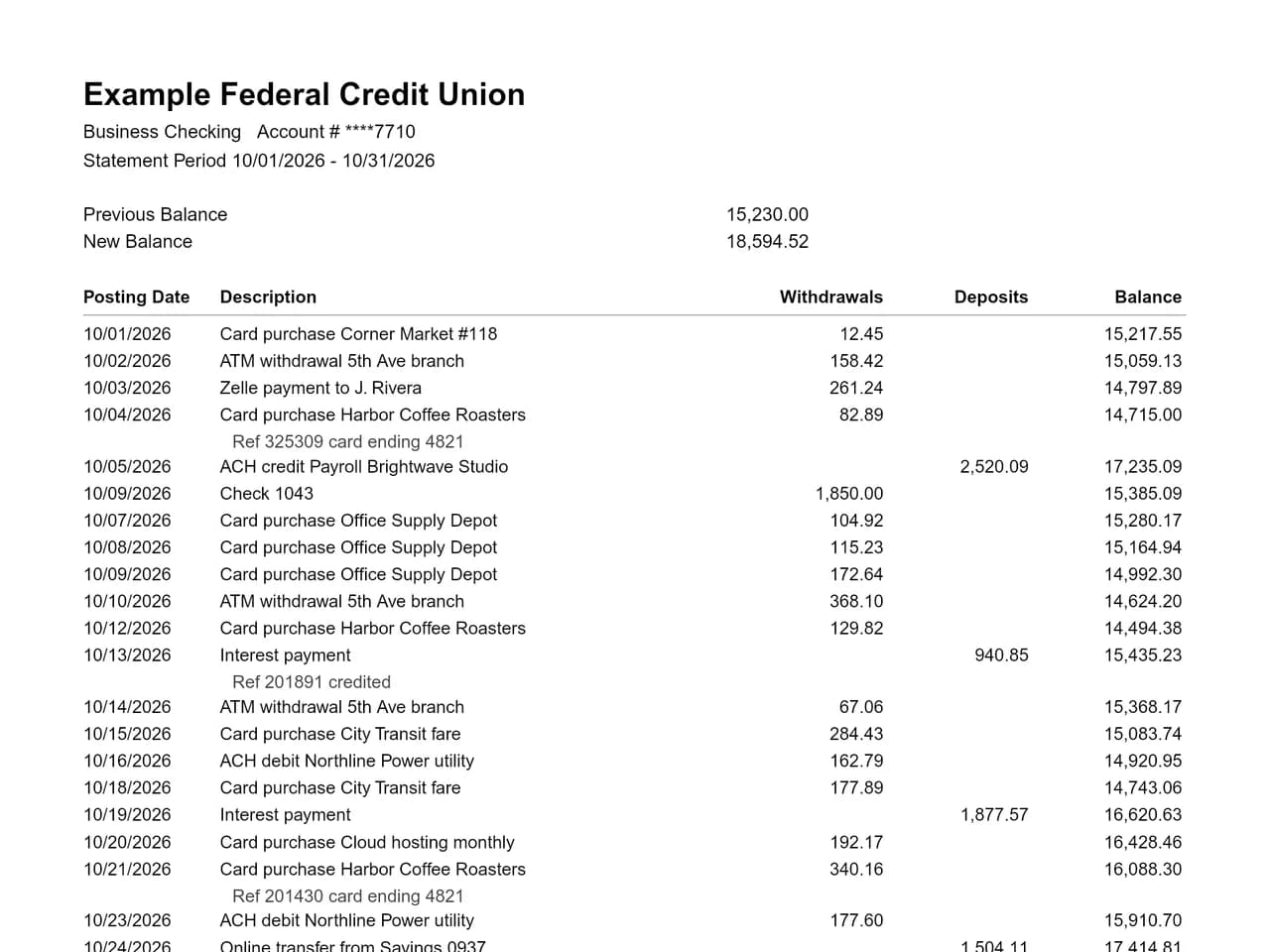
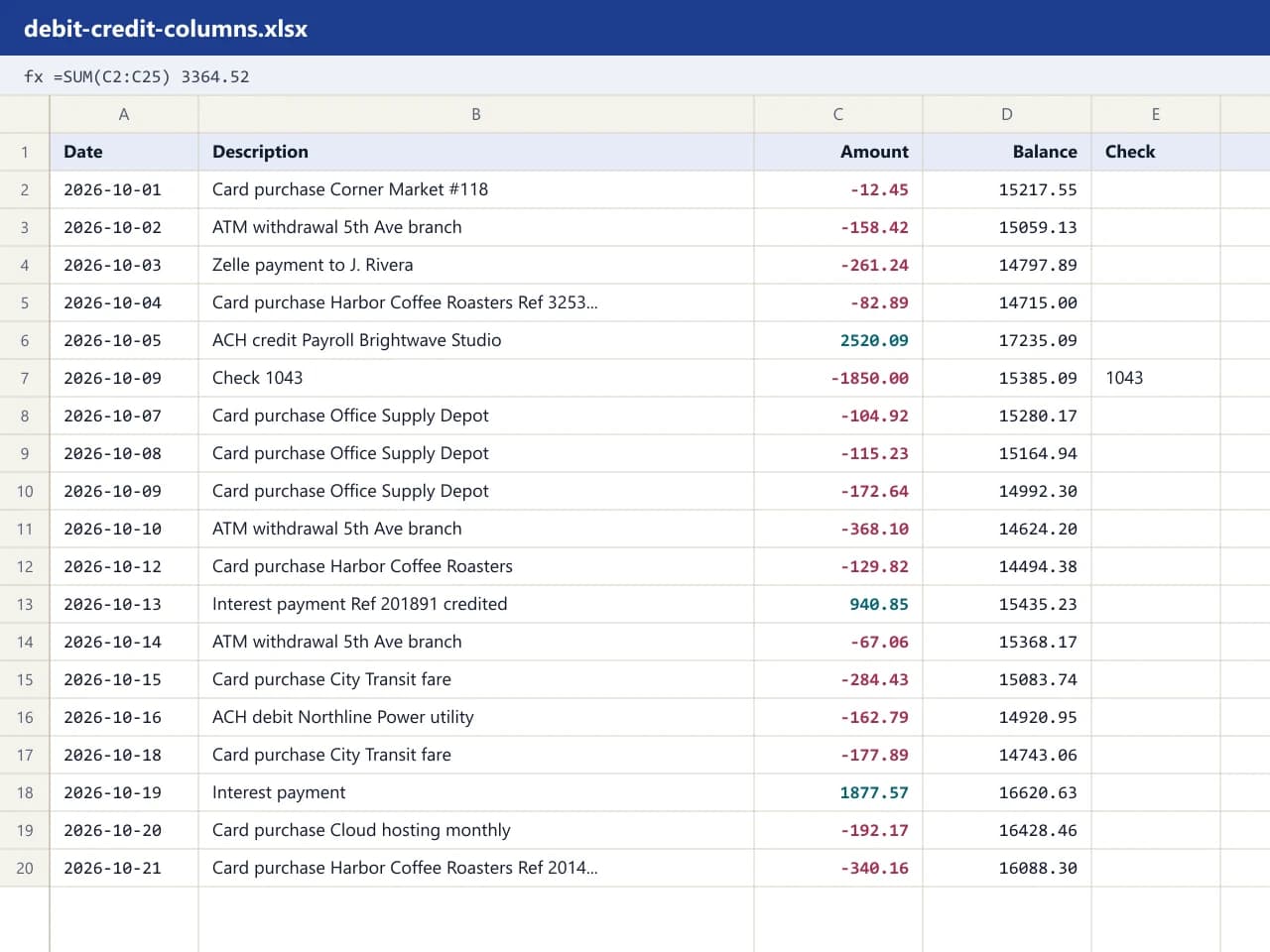
We ran one of our own test statements through the same code the tool on this page uses. So the pictures and the numbers below come from that run, not from a mockup.
 Balanced
- Test input
- debit-credit-columns.pdf
- Output
- debit-credit-columns.xlsx
- Rows
- 24
- Money in
- 8243.43
- Money out
- 4878.91
- Pages
- 1
- Currency
- USD
- Output size
- 9 KB
- Engine time
- 16 ms
How we test: each test statement prints an opening and a closing balance, and the run only counts when the rows add up to both. More on the about page.
What the free bank statement converter includes
The free statement is the full tool, not a cut down demo. In fact, you get every export format from one run, the balance check, support for locked PDFs and the same engine that paid users get. The only limits are the count and the size: one statement per account, up to 5 pages.
You can upload a file and see the preview without an account. To download, you create a free account with an email or Google, and you never add a card. That keeps the free path short, with a few clicks from PDF to spreadsheet.
What happens with a longer statement
Some statements run past 5 pages, especially for a busy business account. In that case, the tool still reads the file and shows you the first 5 rows as a preview. That preview does not use up your free statement, so you can see that your layout works before you pay anything.
To convert the whole file, you pay for that one statement or use a plan. Pages are the credits, so a 12 page statement uses 12 pages. One statement costs $2.99 up to 10 pages, then $0.20 a page, up to 60 pages and 15 MB. Plans start at $29 a month for 500 pages, while Business gives 5,000 pages a month for $79.
Why free does not mean careless with your file
Free tools often pay for themselves with your data, but we do not. The PDF stays in memory while the converter reads it, and the server discards it once the response leaves. As a result, nothing goes to disk, and we never ask for an online banking login.
In addition, the rows pass the same balance check as a paid run. The opening balance plus all rows must equal the closing balance, and each running balance must match the row above plus its amount. If the numbers disagree, the stamp says Check rows, so a free file never hides a missing line.
When this is not the right tool
If you need to convert many statements, one free statement will not go far, and we take one file per run anyway. For a backlog of a few dozen months, a monthly plan fits better. For hundreds of files in one upload, a tool with bulk upload is the honest choice.
Scanned paper statements and phone photos do not work here, because we have no OCR yet. Also, if your bank already gives you a CSV export for the dates you want, use it. You only need a converter when the PDF is all you have.
Free bank statement converter limits
| Item | Detail |
|---|---|
| Free statements | 1 per account |
| Pages in the free statement | Up to 5 |
| Account needed | A free one to download, no card |
| Longer file | First 5 rows as a preview, free statement kept |
| Pay per statement | $2.99 up to 10 pages, then $0.20 a page, up to 60 pages |
| Plans | From $29 a month for 500 pages |
Bank statement converter free FAQ
Is there a free bank statement converter with no sign up?
Almost. You can upload and see a preview with no sign up. To download, you need a free account, and the first statement on it is free up to 5 pages. You get the same files and the same balance check as a paid run.
What counts as one free statement?
One PDF file of up to 5 pages, converted in one run. For example, a 3 page statement uses your free statement, and the 2 spare pages do not carry over.
Are free conversions less accurate?
No, because free and paid runs use the same engine and the same balance check. The only differences are the page limit and the count.
Do I need a credit card to try it?
No. You only pay when you need a second statement or a statement longer than 5 pages.
Is my bank statement stored?
No. The file stays in memory for the run, and the server drops it after the response. We never write it to disk.