Convert OFX to Excel
To convert OFX to Excel, upload the .ofx file and press Convert. Statesift turns each transaction into a spreadsheet row with a real date, a signed amount and separate debit and credit columns. The header stays frozen and the filter is on, so you can sort, total and pivot your bank data right away.
By The Statesift team (Product and testing). Last updated .
OFX, QFX, QBO up to 15 MB. Read in memory, never stored.
How to convert OFX to Excel, step by step
- Get the .ofx file from your bank, card issuer or finance app. QFX and QBO files work as well.
- Drop the file into the box above and press Convert.
- Check the preview: it shows the period, the row count and the money in and out totals.
- Download the .xlsx file and open it in Excel or Google Sheets, then start your analysis.
Your first statement is free with a free account, up to 5 pages. After that, see the pricing page for prices and plans, or read how we test the tool.
OFX to Excel tested with a real statement
We ran one of our own test bank files through the same code the tool on this page uses. So the pictures and the numbers below come from that run, not from a mockup.

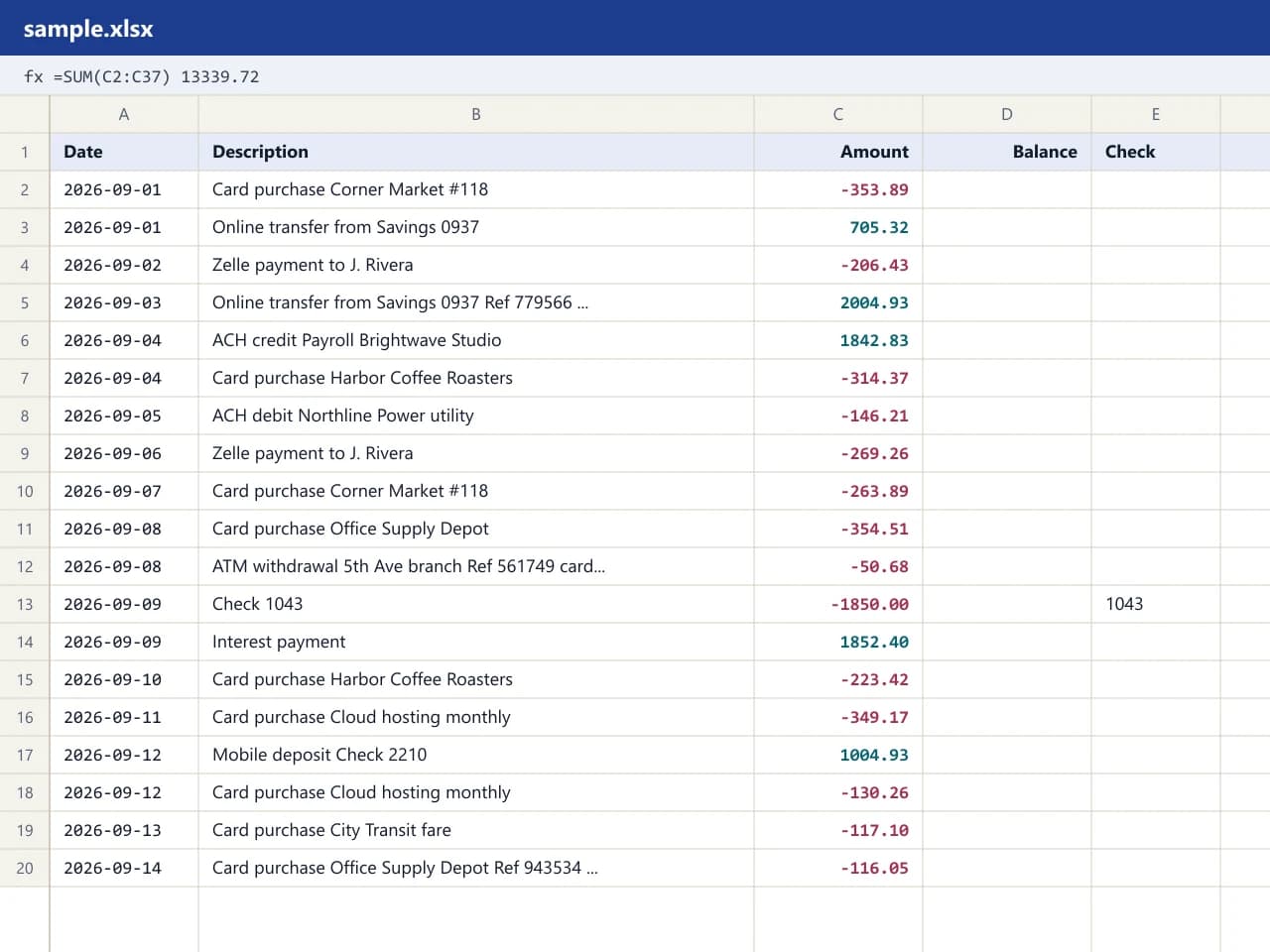
- Test input
- sample.ofx
- Output
- sample.xlsx
- Rows
- 36
- Money in
- 19495.53
- Money out
- 6155.81
- Currency
- USD
- Output size
- 9 KB
- Engine time
- 31 ms
How we test: each test statement prints an opening and a closing balance, and the run only counts when the rows add up to both. More on the about page.
Why analyze an OFX file in Excel
An OFX file holds the same transactions your bank shows online, but in tagged text for software. Money apps read it well, yet they decide how you see the data. A spreadsheet hands that control back to you. You choose the columns, the totals and the charts.
So people convert OFX to Excel for questions an app does not answer well. How much went to one store this year? Which months ran short? What did a trip really cost? With one row per transaction, a filter or a SUMIF formula answers each of those in under a minute.
What the OFX to Excel workbook contains
The Transactions sheet has seven columns: Date, Description, Amount, Debit, Credit, Balance and Check number. Dates are true Excel dates and amounts are true numbers, so sorting and formulas work without cleanup. Money out is negative and money in is positive, and the Debit and Credit columns split the same value for people who prefer two columns.
We also join the payee name and the memo from the file into one description, which makes searching easier. Check numbers go to their own column. A second sheet, called Check, holds the ledger balance from the file and the opening balance we work back from it. Because an OFX file has no running balance per row, the Balance column stays empty for these files.
Ideas for working with OFX data in Excel
First, turn the Transactions sheet into a PivotTable. Put Description in rows and Amount in values, and you get spending by payee in a few clicks. Microsoft's PivotTable guide walks through the steps if you have not built one before.
Next, add a month column with a simple formula on the Date column, then pivot by month to see cash flow over time. You can also filter the Amount column for values below zero to list only money out. Finally, if you share the data with someone on another tool, take the CSV from the same run, since almost every app can read it.
When this is not the right tool
If your bank lets you download a CSV or Excel file directly, start there, as it skips one conversion step. Similarly, if you want automatic categories, budgets or live bank sync, a money app does that and we do not. We do not label or group your spending for you.
Also, we read one file per run. If you have a folder of monthly OFX files, convert them one at a time and paste the rows into one sheet. And if the file came from a PDF statement in the first place, convert that PDF instead, because our PDF converter can check each row against the printed balances.
OFX to Excel at a glance
| Item | Detail |
|---|---|
| Input | OFX 1.x or 2.x, QFX or QBO file |
| Output | .xlsx workbook with Transactions and Check sheets |
| Columns | Date, Description, Amount, Debit, Credit, Balance, Check number |
| Sign rule | Money out negative, money in positive |
| Also included | CSV, PDF report, OFX, QFX, QBO and JSON |
| Storage | None: read in memory and discarded |
OFX to Excel FAQ
How do I convert an OFX file to Excel?
Upload the .ofx file on this page and press Convert, then download the .xlsx file. Each transaction becomes one row with a real date and a number you can add up.
Can I open the result in Google Sheets?
Yes. Google Sheets opens .xlsx files, and it can also import the CSV from the same run. Both keep one row per transaction.
Why is the Balance column empty?
OFX files list each transaction but not the balance after it. We leave that column empty instead of guessing. The Check sheet still shows the ledger balance that the bank put in the file.
Does OFX to Excel work for credit card files?
Yes. Card files work the same way: purchases come out as negative amounts and payments or refunds as positive ones, so totals read like a checking account.
Is there a free OFX to Excel converter?
Yes. Your first file here is free with a free account. Each run gives you the Excel file, a CSV and a printable PDF report.