A simple DocuClipper alternative for digital bank statements
Statesift is a DocuClipper alternative for people who convert a few digital PDF statements and want no trial and no monthly plan. You upload one statement, it checks every row against the printed balances, and you get Excel, CSV, QBO, QFX, OFX and JSON. For scans or bulk work, DocuClipper is the stronger tool.
By The Statesift team (Product and testing). Last updated .
PDF up to 15 MB. Read in memory, never stored.
How to try Statesift as a DocuClipper alternative, step by step
- Download one statement from your online banking as a PDF.
- Drop it into the converter above, with the password if the bank locked the file.
- Press Convert and read the balance stamp: Balanced, Check rows or No balance.
- Download the format you need. Compare the result with what you get from DocuClipper's free trial if you are still choosing.
Your first statement is free with a free account, up to 5 pages. After that, see the pricing page for prices and plans, or read how we test the tool.
DocuClipper alternative tested with a real statement
We ran one of our own test statements through the same code the tool on this page uses. So the pictures and the numbers below come from that run, not from a mockup.
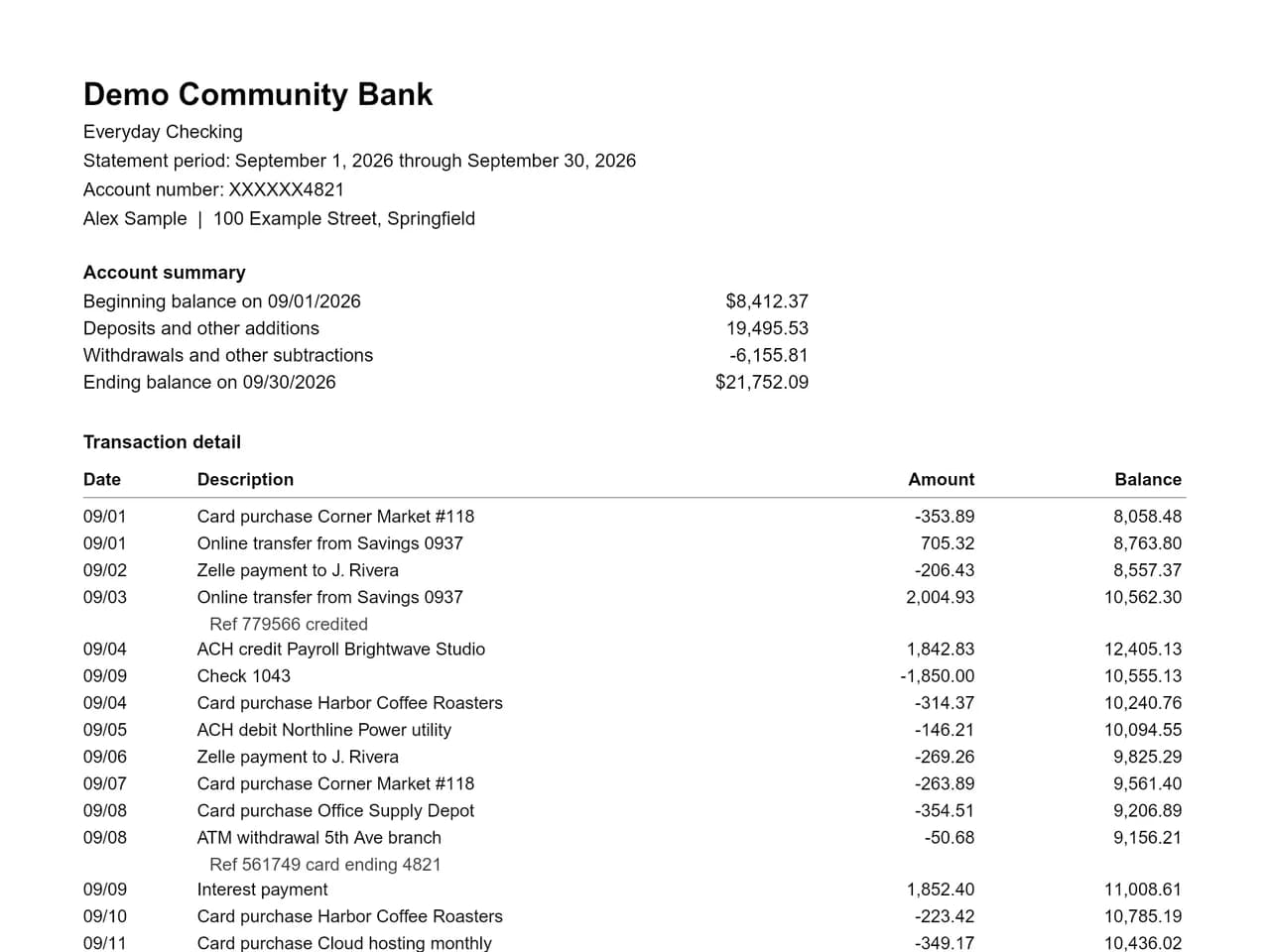
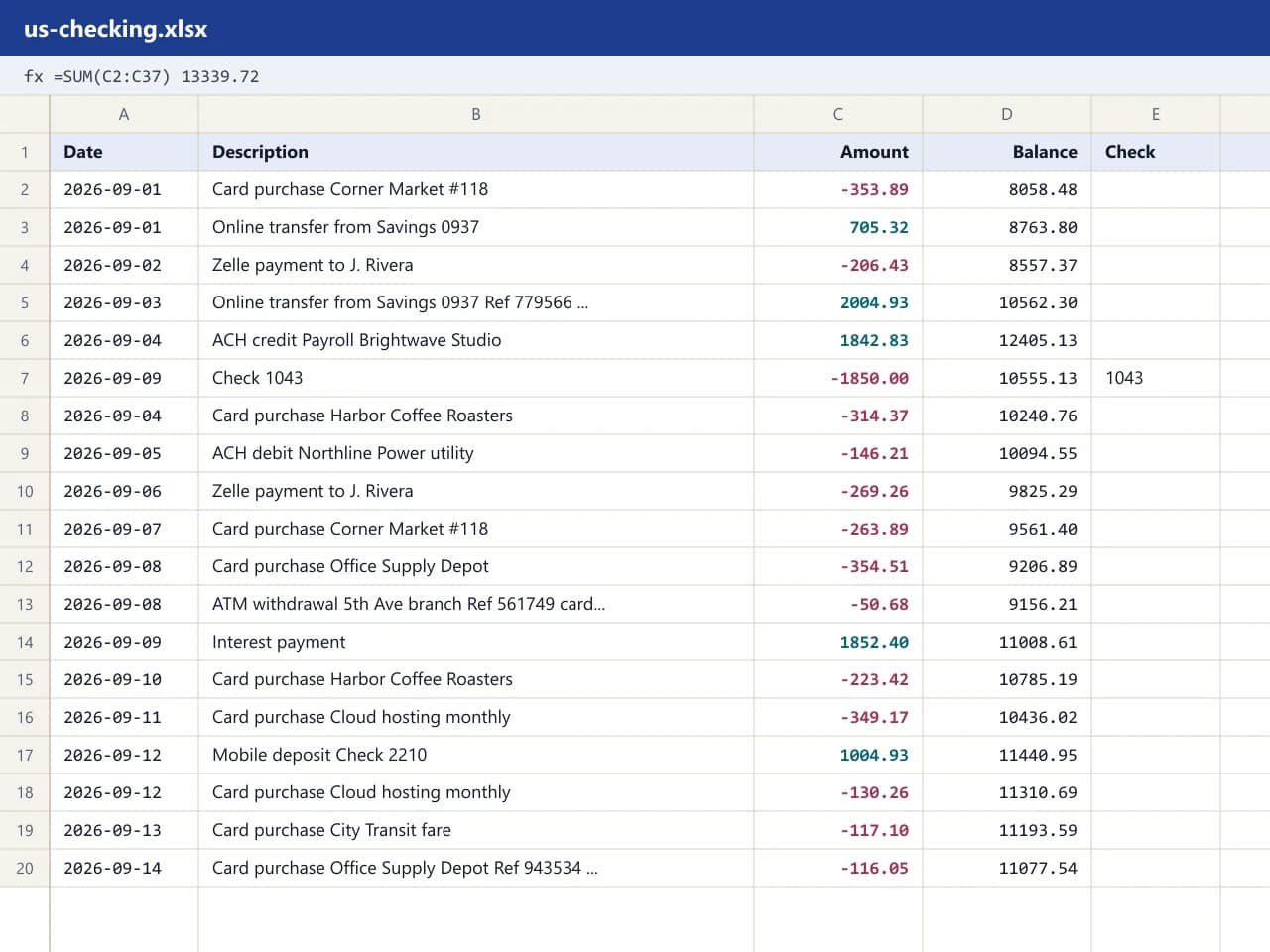 Balanced
- Test input
- us-checking.pdf
- Output
- us-checking.xlsx
- Rows
- 36
- Money in
- 19495.53
- Money out
- 6155.81
- Pages
- 2
- Currency
- USD
- Output size
- 9 KB
- Engine time
- 25 ms
How we test: each test statement prints an opening and a closing balance, and the run only counts when the rows add up to both. More on the about page.
Where DocuClipper is the better choice
We read DocuClipper's own site on November 25, 2026, and it does several things we do not. First, it reads scanned statements and phone photos with OCR, while we only read PDFs that carry a text layer. Second, it takes statements in bulk: by upload, by email forwarding, from Google Drive, Dropbox, OneDrive or Box folders, or through an API. We take one file per run.
In addition, DocuClipper lists automatic categorization, client reports, invoice and receipt capture and direct pushes into QuickBooks Online and Xero. Its site also states a SOC 2 Type II audit and unlimited users on every plan. So if you run a firm, handle scanned client paperwork or convert a year of statements at once, DocuClipper is the better fit, and Statesift is not the right DocuClipper alternative.
Why some people want a lighter DocuClipper alternative
Many people only need one or two statements now and then. For example, a household may want a year of spending in a sheet at tax time, or a freelancer may need last month for a client. For that kind of job, a plan with a monthly page allowance can feel like more than you need.
Statesift starts with a free statement. Your first one is free with a free account, up to 5 pages, and no card. After that, you pay $2.99 per statement up to 10 pages, then $0.20 a page, with no plan. By contrast, DocuClipper's pricing page lists a 14 day free trial with no credit card. Its Starter plan shows 60 pages a month for $29 billed monthly, while our Starter plan gives 500 pages for the same $29.
How each tool checks the numbers
Both tools check the result against the statement itself. DocuClipper's site says it compares extracted totals with the printed opening and closing balances and flags any statement that does not tie out. That is the right approach, and it is also what we do on every run.
We add one more step when the statement prints a running balance. Each row must equal the row above plus its amount, so a single missed or misread line shows up at its exact spot. The running balance also fixes the sign of each amount and spots statements that list the newest rows first. The result appears as a stamp before you download anything.
Privacy and what happens to your file
With Statesift, a free account holds only your email, your pages and your plan, and we never ask for a bank login. We read the file in memory, build the outputs and discard the file once the response goes out. Nothing goes to disk, and we keep no rows after you download them.
DocuClipper works as an account based platform with projects, team members and saved reports, which suits firms that want history in one place. It also publishes a security page and a SOC 2 Type II audit, which we do not have. Therefore, the choice depends on whether you want a workspace that keeps your data or a quick tool that forgets it.
DocuClipper alternative: the two tools side by side
| Feature | Statesift vs DocuClipper (from docuclipper.com, Nov 25, 2026) |
|---|---|
| Scanned statements (OCR) | Statesift: no. DocuClipper: yes |
| Bulk and automated intake | Statesift: one file per run. DocuClipper: bulk upload, email, cloud folders, API |
| Balance check | Both check printed opening and closing balances. Statesift also checks each running balance |
| Outputs | Statesift: Excel, CSV, QBO, QFX, OFX, JSON. DocuClipper: Excel, CSV, QBO, QFX, OFX, QIF, Xero |
| Free use | Statesift: first statement free, up to 5 pages, free account. DocuClipper: 14 day trial, no card |
| Paid pricing | Statesift: $2.99 per statement, or $29 a month for 500 pages. DocuClipper: from $29 a month for 60 pages |
DocuClipper alternative FAQ
What is a good DocuClipper alternative for one statement?
If the statement is a digital PDF from your online banking, Statesift converts it in one run, with Excel, CSV and accounting formats. Your first statement is free with a free account, and after that one statement costs $2.99 up to 10 pages.
Can Statesift read scanned bank statements like DocuClipper?
No. We have no OCR yet, so scans and photos will not convert, and the tool tells you so. DocuClipper's site says it reads scanned statements, so use it for those.
Is DocuClipper free?
Its pricing page lists a 14 day free trial with no credit card, then paid plans that count pages per month. Check their page for the current numbers, since prices change.
Does Statesift connect to QuickBooks or Xero directly?
No. You download a QBO file for QuickBooks or a CSV or OFX file for Xero and import it yourself. DocuClipper lists direct pushes into QuickBooks Online and Xero.
Which one is cheaper?
It depends on volume. For a few statements, paying $2.99 per statement costs less than any plan. For dozens of statements every month, compare our plans, from $29 for 500 pages, with DocuClipper's page based plans.