Convert a bank statement to Excel
To convert a bank statement to Excel, upload the PDF from your bank and press Convert. Statesift reads every transaction line, puts it in its own row with a real date and a signed amount, and checks the total against the opening and closing balance. Then you download a ready .xlsx workbook.
By The Statesift team (Product and testing). Last updated .
PDF up to 15 MB. Read in memory, never stored.
How to convert a bank statement to Excel, step by step
- Download the monthly statement from your online banking as a PDF.
- Drop the PDF into the converter above. If the bank locked it, type the password you use to open it.
- Press Convert and read the balance check: it tells you whether the rows add up to the closing balance.
- Download the Excel file and open it. Each row is one transaction, and the Check sheet holds the totals.
Your first statement is free with a free account, up to 5 pages. After that, see the pricing page for prices and plans, or read how we test the tool.
Bank statement to Excel tested with a real statement
We ran one of our own test statements through the same code the tool on this page uses. So the pictures and the numbers below come from that run, not from a mockup.
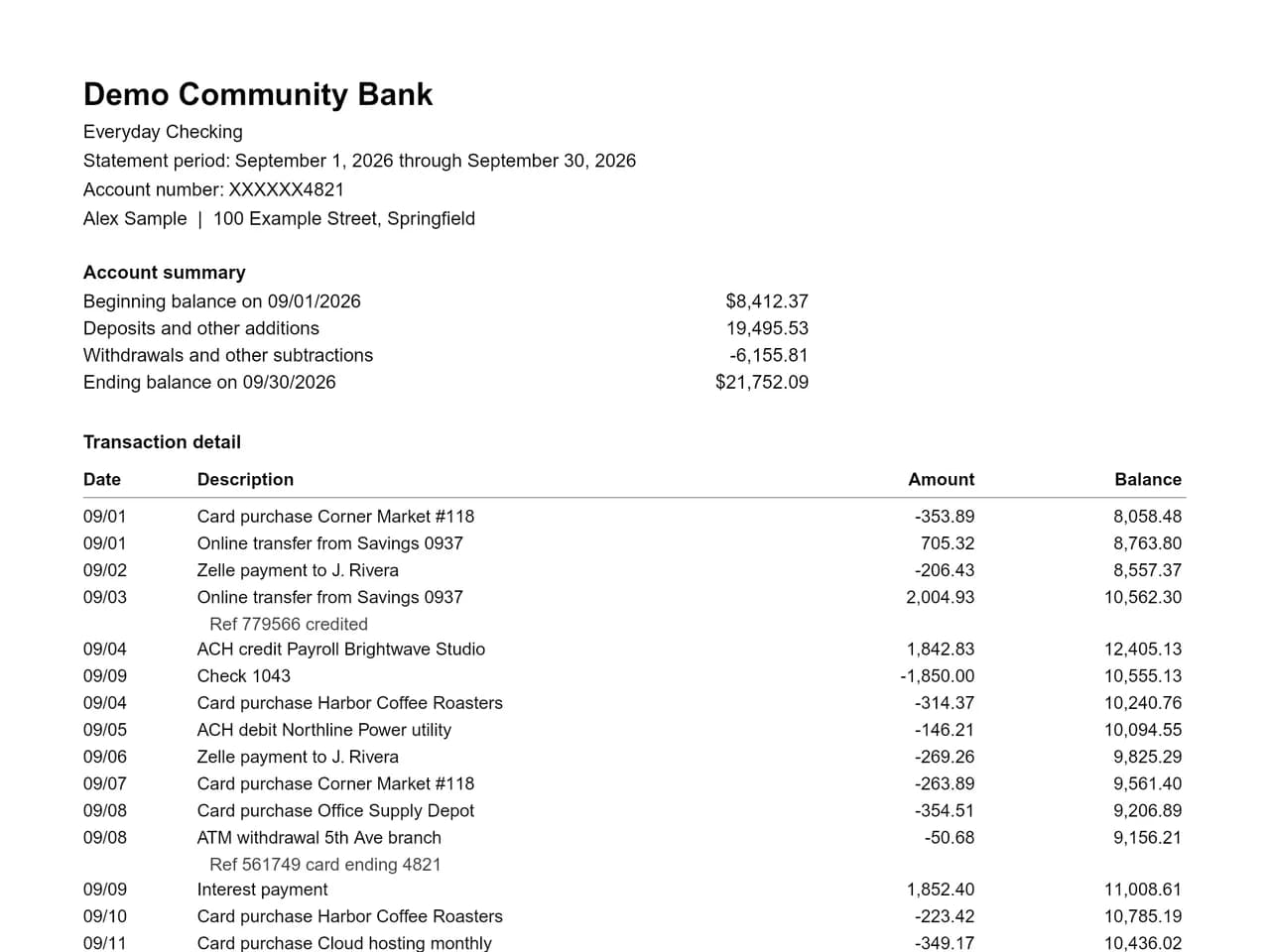
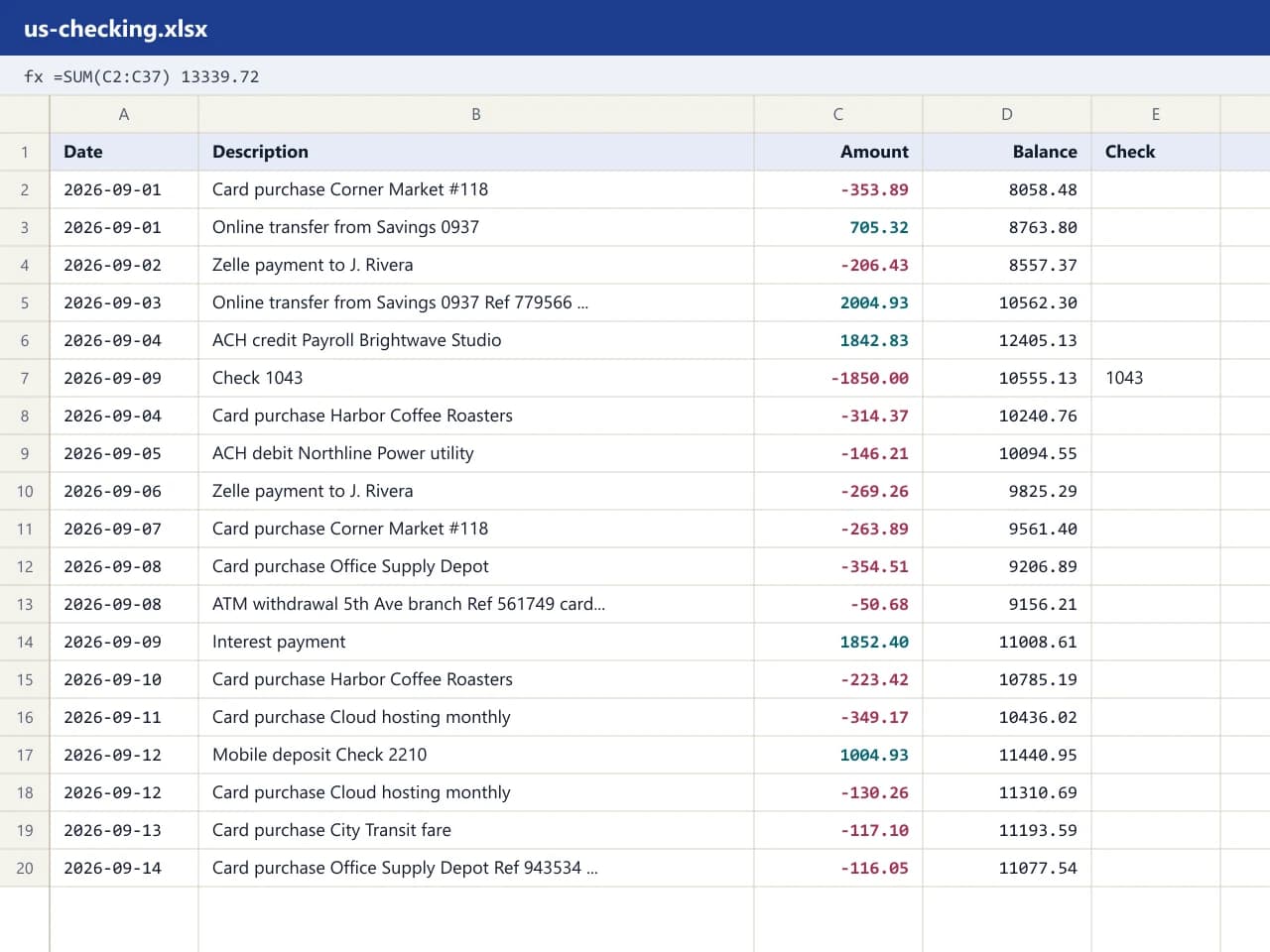 Balanced
- Test input
- us-checking.pdf
- Output
- us-checking.xlsx
- Rows
- 36
- Money in
- 19495.53
- Money out
- 6155.81
- Pages
- 2
- Currency
- USD
- Output size
- 9 KB
- Engine time
- 40 ms
How we test: each test statement prints an opening and a closing balance, and the run only counts when the rows add up to both. More on the about page.
What you get in the Excel file
The workbook has two sheets. First, the Transactions sheet lists one transaction per row, with Date, Description, Amount, Debit, Credit, Balance and Check number columns. Dates are real Excel dates, so sorting and filtering work right away. Amounts are numbers, not text, so SUM and pivot tables work too.
Second, the Check sheet shows the opening balance, the closing balance and the result of the balance check. As a result, you can see at a glance whether every row was read. Money out is negative and money in is positive, which is the same rule most bookkeeping tools expect.
Why the balance check matters for a bank statement to Excel export
Copying a statement by hand is slow, and copy and paste from a PDF often breaks columns. Worse, you can easily overlook a single missed line in a long month. That is why we check every conversion against the numbers your bank printed.
When the statement shows a running balance, the converter compares each row with the row above it. In addition, the opening balance plus all rows must equal the closing balance. If anything is off, the result says so before you download, so you never import a sheet that is silently wrong.
Which statements work
Statements that you download from online banking work best, because they carry a text layer. Checking, savings and credit card statements all work, and so do layouts with one amount column or separate debit and credit columns. Both month first dates (09/30) and day first dates (30/09) come straight from the statement itself, and the converter reads both.
Scanned paper statements are different. A photo or a scan has no text layer, so this converter cannot read it yet, and it tells you so instead of guessing. For those, ask your bank for the PDF version, which most banks offer for at least the last 12 months.
When this is not the right tool
If your bank already offers a CSV or Excel download for the period you need, use that first. It comes straight from the bank's system, so nothing has to be read from a PDF. Likewise, if you need years of history in one go, ask the bank for an export, since we convert one statement file at a time.
Finally, we do not categorize spending or connect to your bank account. Statesift only turns the statement you upload into rows, and it deletes the file as soon as the download is ready.
Bank statement to Excel at a glance
| Item | Detail |
|---|---|
| Input | PDF bank or credit card statement with a text layer |
| Output | .xlsx workbook, plus CSV, QBO, QFX, OFX and JSON |
| Columns | Date, Description, Amount, Debit, Credit, Balance, Check number |
| Free use | First statement free, up to 5 pages, with a free account |
| Paid limit | 60 pages and 15 MB per statement |
| Storage | None: the file is read in memory and discarded |
Bank statement to Excel FAQ
How do I convert a bank statement PDF to Excel for free?
Upload the PDF on this page and press Convert. Your first statement is free with a free account, up to 5 pages. Longer statements show a preview of the first rows, and you can pay for that one file from $2.99.
Can Excel open a PDF bank statement directly?
Excel for Microsoft 365 can import a PDF through Power Query, but bank statements rarely come out clean: wrapped descriptions split into extra rows and amounts land in the wrong column. A converter that knows statement layouts saves that cleanup.
Is it safe to upload my bank statement?
We read the file in memory, convert it and discard it. We do not store statements, we do not keep the rows after you download them, and we never ask for your online banking login.
What if the balance check fails?
The result names how many rows disagree with the running balance, or how far the total is from the closing balance. Usually the bank printed one line in an unusual way. Check those rows in the preview before you import the file anywhere.
Does it work with credit card statements?
Yes. The converter spots card statements from words such as credit limit and minimum payment. Purchases come out as money out, payments and refunds as money in, so the sheet reads the same way as a checking account.